
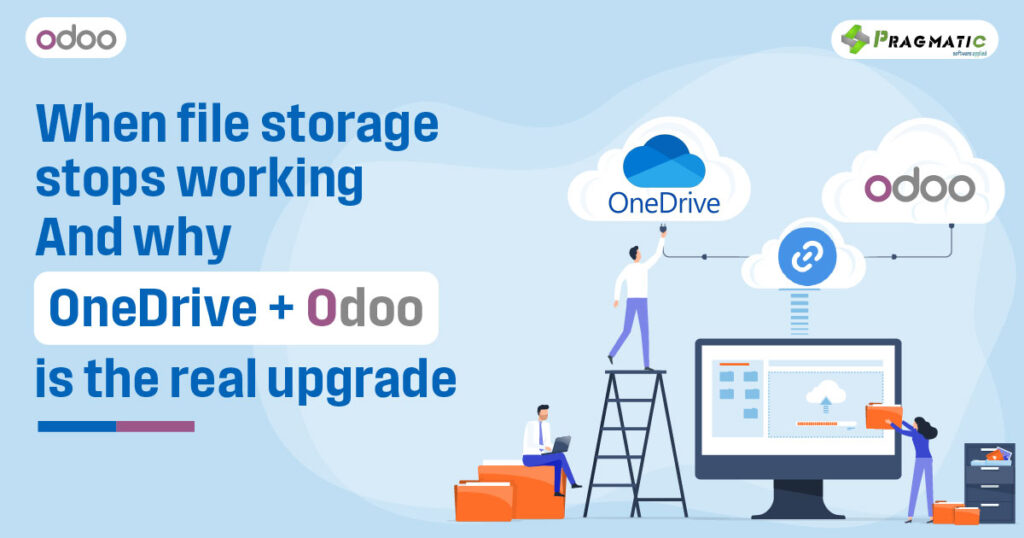
OneDrive stores files. ERP drives work.
A document management tool like OneDrive is simple, predictable and familiar – and that’s part of its charm.
Files live in clearly labelled folders, access can be granted in seconds and sharing takes nothing more than a link. For many businesses, especially in early stages, that is all they need. They’re not struggling with workflows yet; they’re simply trying to ensure that documents don’t get lost in email attachments or locked away inside someone’s local drive.
But as organisations grow, something subtle begins to happen. The PDF is there, the folder exists, the naming is correct – yet no one is quite sure what decision was made around that document. A quotation may sit neatly inside /Sales/Quotes/2024 – but the folder doesn’t tell you whether the customer accepted it.
A purchase invoice may be scanned and uploaded – but the file alone doesn’t reveal whether finance has approved it or whether it has been matched to a Purchase Order. Files become passive objects: they exist, but they do not communicate what is happening behind them.
This is when business leaders discover an uncomfortable truth –
Documents are not the same as decisions.
OneDrive is brilliant at storing the first.
An ERP is designed to manage the second.
Why businesses feel comfortable starting with OneDrive
Almost every company begins in a light, flexible environment: small teams, direct communication, fewer stakeholders and a workflow that survives comfortably on verbal updates and shared folders. In this context, OneDrive feels almost ideal. It requires no onboarding, no training workshops, no structured implementation, no governance – people simply save and retrieve.
OneDrive gives freedom before discipline is necessary.
And in the early years, that is often the right way to operate.
When sales volumes are modest, when procurement happens occasionally, when finance is still handled manually, and when everyone sits close enough to ask, “Has this been approved yet?” – there is no urgent need for automated workflow intelligence. What the business values most is speed, not structure.
The irony is that this comfort is exactly what masks the early warning signs. OneDrive doesn’t fail loudly. It stretches quietly – until the business grows, and suddenly the very simplicity that once felt liberating becomes the bottleneck.
The silent breaking point : Files are fine but work is slow
Businesses do not wake up and declare, “We have outgrown OneDrive.”
The transition happens almost invisibly.
It begins when two employees save two different versions of the same contract – and neither can confidently say which version was sent to the client. It shows up when a purchase order sits in the vendor folder, but the GRN arrives separately, the invoice lands in another department and the payment approval lies buried in mail threads.
The files still exist – nothing is technically lost – but the business outcome is unclear.
People start searching more than deciding.
They investigate instead of executing.
You open five documents just to understand what stage a transaction is in. You chase colleagues for updates instead of seeing them reflected in a system. Processes move, but the movement is invisible, untraceable, memory-dependent.
This is not a technology failure. It is a workflow maturity shift.
And workflow cannot be solved with more folders.
When storage must evolve into structured workflow
Growth brings complexity. Not because people become less capable, but because volume multiplies dependencies. Ten sales orders can be tracked informally; five hundred cannot. Three purchase invoices can be reconciled manually; two hundred will break accounting. Five employees can self-coordinate; fifty cannot rely on memory and chat threads.
At this stage, the business no longer needs just a place for documents to live – it needs a system that understands what those documents represent.
A sales order isn’t just a file – it is a commitment.
A purchase invoice isn’t just a PDF – it is a financial liability.
A delivery note isn’t just a scanned sheet – it is inventory movement and revenue recognition.
Files contain information. ERPs give meaning to that information.
That transition from storage to structure is the moment where companies mature operationally.
What ERP adds that storage alone never can
An ERP does not replace OneDrive; it elevates what OneDrive cannot interpret.
A sales order attached inside Odoo isn’t just saved – it sits inside a chain of dependent actions :
- Has stock been allocated?
- Has the order been confirmed?
- Has billing been raised?
- Has payment been recorded?
The document doesn’t just exist, it participates.
ERP introduces traceability – so decisions cannot disappear.
It enforces approval paths – so accountability is visible.
It eliminates duplicate versions – so confusion has nowhere to hide.
It accelerates decision-making – because information isn’t buried inside files, it’s connected to workflow.
Where OneDrive provides access, ERP provides direction.
Signs you’ve outgrown file-only operations
Growth exposes workflow gaps long before leadership acknowledges them.
You know you’re reaching the tipping point when :
- Files are organized, but work feels chaotic
- People ask for updates instead of seeing them reflected in a system
- Status tracking happens in Excel because OneDrive cannot represent it
- Versions coexist and no one knows which one is final
- Follow-ups happen manually, repeatedly, endlessly
- Work moves but documentation doesn’t show movement
Storage is working. Execution is struggling.
This is the moment where an ERP stops being optional and becomes inevitable.
You don’t replace OneDrive – you give it intelligence
The smartest companies don’t abandon OneDrive when they adopt ERP. They integrate it to preserve familiarity while gaining structure.
Documents continue to live in OneDrive, but instead of being passive files, they become active participants in Odoo workflows. The file is still available in the cloud, still previewable in Office Online, still shareable externally – but the business logic sits inside Odoo, not inside someone’s inbox or memory.
The team doesn’t change where they store files.
They simply gain a system that understands the purpose behind each file.
OneDrive remains on the shelf. ERP becomes the supply chain.
How OneDrive + Odoo together create business clarity
This is where Pragmatic’s Odoo-OneDrive integration becomes transformative not because it adds features, but because it restores meaning to documents.
When a file is added in Odoo, it automatically syncs to OneDrive. When someone uploads from OneDrive, the file becomes instantly accessible from the relevant record inside Odoo – whether it belongs to a customer, a sales order, an employee or a purchase transaction. Files no longer float independently; they anchor themselves to business processes.
Updates are mirrored across systems. Deletions remain consistent.
Version confusion disappears.
The Odoo database stays light and fast because documents live in OneDrive storage instead of filling ERP storage capacity.
The document becomes the starting point – not the end point.
Deep insights on the Odoo OneDrive integration
Pragmatic’s OneDrive integration is built on the principle that document storage should remain simple, but business execution should never depend on memory or manual tracking. The integration ensures this by establishing a two-way synchronization channel between Odoo and OneDrive.
If a user attaches a file to a sales order inside Odoo, the file is automatically uploaded to OneDrive in a structured path – not as a loose file, but nested under :
Files → Odoo → [Module] → [Record] → [Document Name]
Meanwhile, documents placed into OneDrive can appear in Odoo without users manually reattaching them. This removes duplication, eliminates misplaced files and simplifies document retrieval forever.
The integration respects lifecycle changes as well.
If a document is deleted in Odoo, the corresponding file vanishes from OneDrive – maintaining consistency without human policing. If a document is modified or replaced in OneDrive, the updated version reflects inside Odoo automatically.
Most importantly, companies can choose whether attachments live only in OneDrive (ideal for performance) or in both OneDrive and Odoo. This gives IT teams control over database load, storage costs and scalability.
And all of this can run on scheduled automation – meaning the sync does not rely on users remembering to upload or maintain structure. The integration handles it.
Why Pragmatic Techsoft is uniquely positioned for this transition
Technology alone doesn’t mature a business – implementation maturity does.
Pragmatic Techsoft has spent over 17 years developing, deploying and customising Odoo environments across industries and with more than 177+ apps, the organisation understands where storage ends and where workflow must take over.
Instead of forcing teams to abandon OneDrive and adopt a new approach, Pragmatic builds a bridge. The habits stay. The location of files stays. The comfort stays. What changes is the clarity, accountability and traceability behind those files.
This is not just software integration.
It is workflow evolution.
💬Connect with our teams to schedule a one-on-one call to learn more or request a free demo and see it for yourself.
FAQs
1) Is OneDrive enough for small teams?
Yes – as long as workflow complexity stays low. Once tracking, approvals, finance reconciliation and audit trails become essential, ERP becomes the natural next step.
2) Do we stop using OneDrive after adopting Odoo?
No. You continue using OneDrive exactly as you do today. Odoo simply adds intelligence, visibility and linkage behind the files you already store.
3) What does ERP add that folders cannot?
Status tracking, approvals, traceability, ownership, inventory linkage, accounts integration, live updates, and a single source of truth.
4) How do I know it’s time to integrate?
When files exist — but decisions don’t. When follow-ups become manual. When Excel becomes the temporary glue holding processes together.
Why Pragmatic Techsoft?
Because we don’t just connect systems – we connect behaviour to structure. We make information move the way business moves.