
What can Odoo 20 change in your working day?
Here’s the real question :
Will Odoo 20 mean less chasing for your team?
That’s worth asking before you get impressed by a shiny new screen or an AI demo.
Odoo 20 launched in September 2026.
The headlines are about AI and automation. But the release also touches manufacturing, sales and warehouse work in smaller, more practical ways.
For a business owner, the details matter more than the headlines.
Can a sale move to delivery without three follow-up emails? Can your production team see what needs attention today? Can finance answer a question without building a new spreadsheet?
This guide walks through the features that actually touch those moments.
One thing worth knowing upfront : not everything in Odoo 20 is new. Some of it – like parts of the manufacturing and website AI tools – already reached Odoo Online through earlier updates.
How much is new to you depends on which version you’re on now.
Odoo 20 features at a glance
Start with whatever’s actually annoying your team right now.
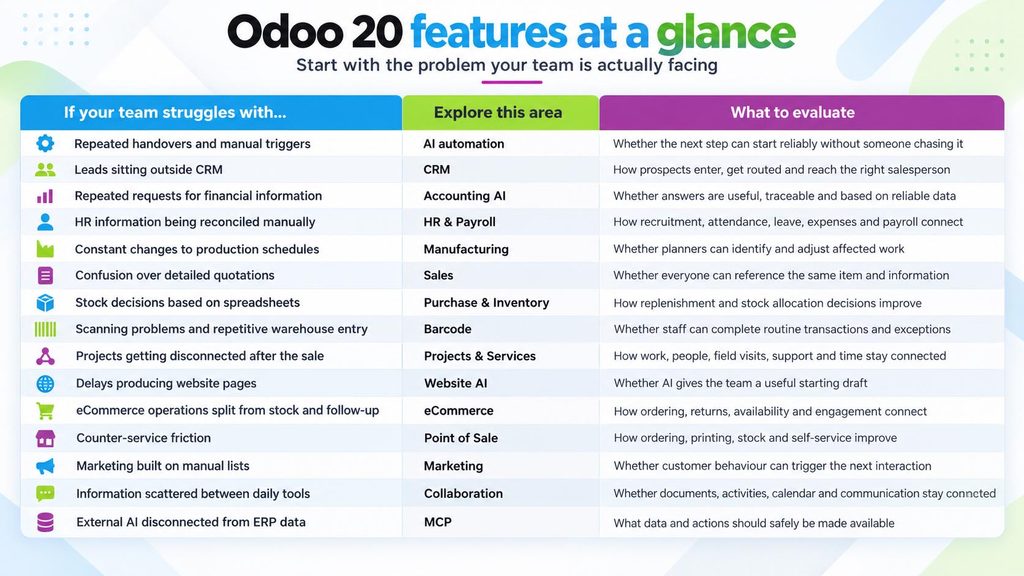
Pick one problem with an obvious owner and a clear symptom. Start there.
AI automation : Get work moving without you chasing it
Odoo 20 lets you automate processes using plain-language instructions.
You describe what should happen, when it should happen and what the agent needs to do. AI agents can also be called by automated or scheduled actions, and Odoo shows information about how the automation was handled so the configuration can be refined.
Think about the processes where someone currently has to remember:
“When this happens, I need to tell that person to do this next.”
That could mean assigning a lead, creating a project after a contract is signed, reacting to low stock or moving an order forward when the right information arrives.
One thing to plan for
Odoo’s release notes state that its AI features require credits purchased through IAP. If you intend to make AI part of a high-volume operational process, that running usage cost should be part of your evaluation.
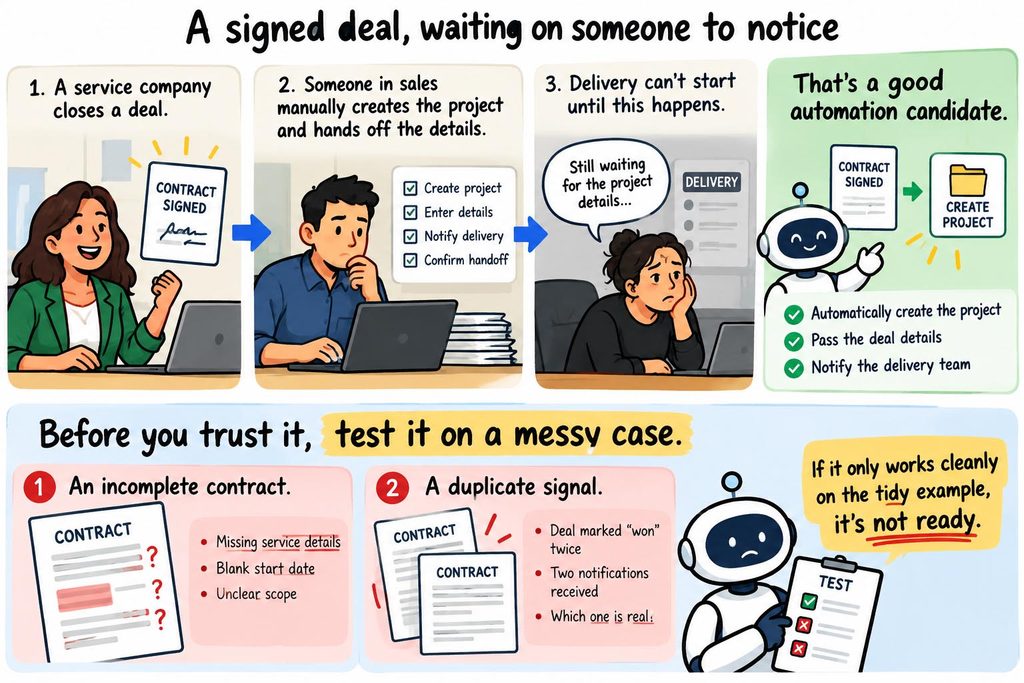
The goal here isn’t flashy AI. It’s one less thing someone has to remember to do.
CRM : Turn more signals into actual sales opportunities
Getting another CRM feature is not particularly useful if your salespeople still have to manually enter every useful prospect into it.
Odoo 20 pushes further into the step before the salesperson starts following up.
Odoo highlights capabilities around finding prospects, bringing contacts into CRM, turning incoming signals into opportunities and using automation to assign leads to the appropriate salesperson. AI automation can also be used to support the next steps once an opportunity enters the pipeline.
The bigger business question is :
How much work happens between identifying a potential customer and getting that opportunity in front of the right salesperson?
If the answer involves copying information between tools, forwarding messages or asking someone to “put this into CRM,” that’s the gap to test.
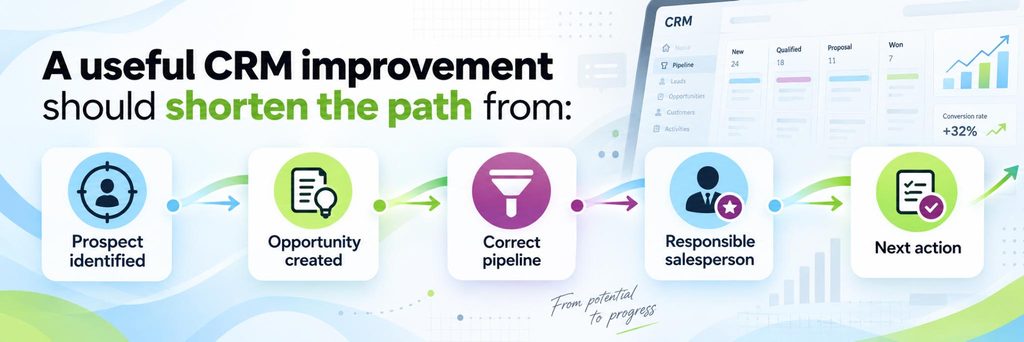
The CRM is only doing its job when the opportunity reaches someone who can actually move it forward.
Accounting AI : Get answers faster
Odoo 20 introduces an Accounting AI assistant designed to answer questions using financial information already in Odoo.
Odoo’s own examples include asking what is outstanding in receivables, checking cash flow and investigating reconciliation problems. It can also analyze reconciliation issues and return findings and recommendations.
Look at an example ⬇️
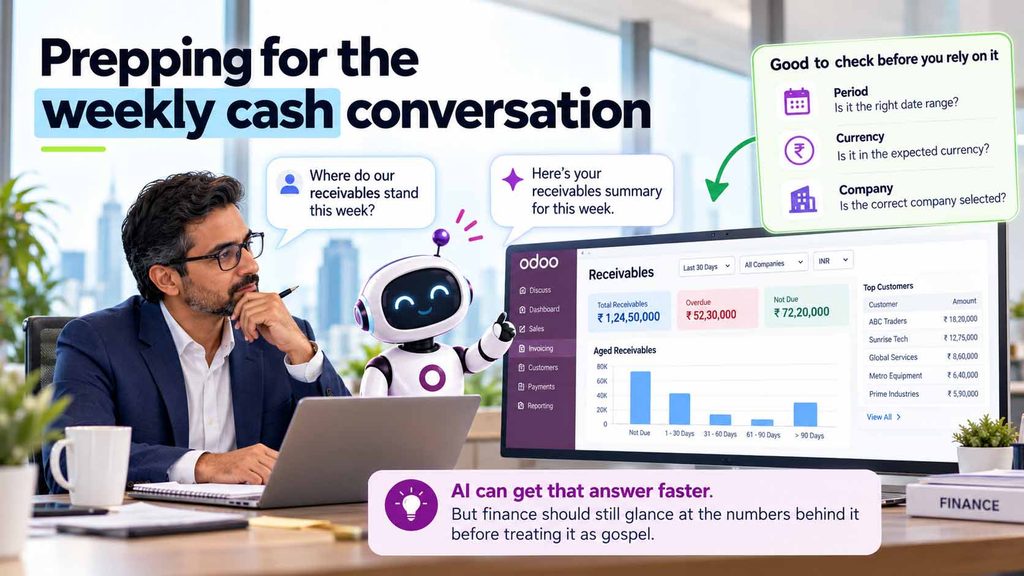
That matters because a surprising amount of finance work isn’t accounting itself. It’s answering questions from people who don’t want to navigate five reports to find one answer.
Odoo 20 also pushes the workflow further by supporting bill payment directly from Odoo instead of making finance teams jump between the ERP, payment files and banking workflows.
A faster question is useful.
A trustworthy answer still comes from good data underneath it.
AI does not repair weak accounting discipline. It simply changes how quickly people can interact with the information that’s there.
HR & Payroll : Connect the employee journey from hiring to payday
One of the biggest gaps in a feature list focused only on AI and manufacturing would be HR.
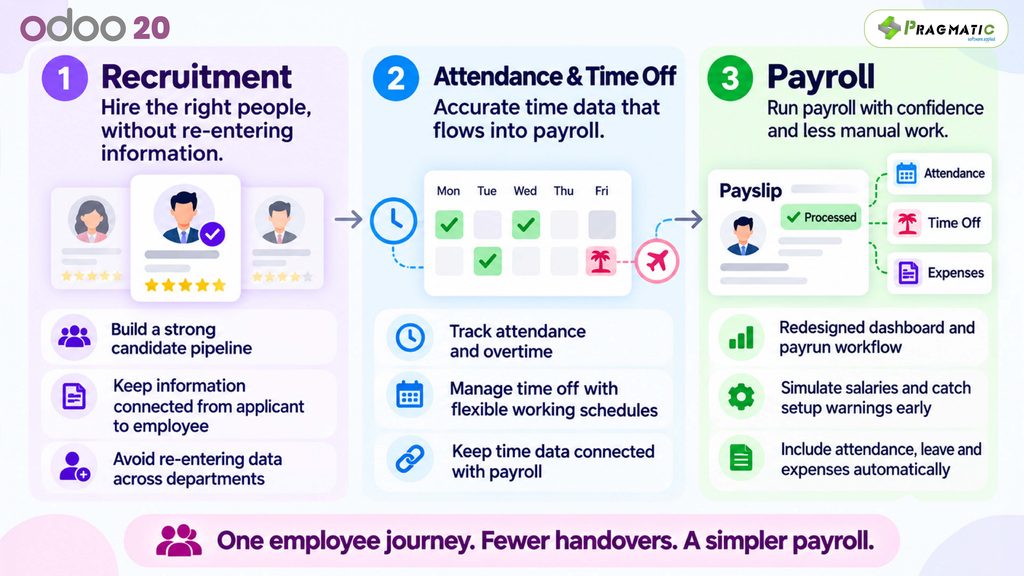
Odoo 20 brings meaningful changes across Payroll, Attendance, Time Off and the broader employee workflow. Odoo describes its Payroll changes around reducing manual work, preventing errors and creating more configurable workflows.
What changes?
Instead of HR rebuilding the employee’s month at payroll time, more of that context can already exist in the same system.
Hiring. Employee record. Attendance. Leave. Expenses. Payroll.
The closer those steps are, the less reconciliation the HR team has to do between them.
Manufacturing : A clearer view when plans change
Production plans rarely survive contact with reality.
A part shows up late. A rush order jumps the queue. One step runs long, and now the next team’s schedule is wrong too.
Odoo 20’s manufacturing updates give planners a Kanban and Gantt view of work orders, drag-and-drop rescheduling, colour-coded status and views by employee.
Worth knowing : Most of this landed in Odoo Online back in the 19.2 update, so if you’re already on a recent Online build, it may not feel new.
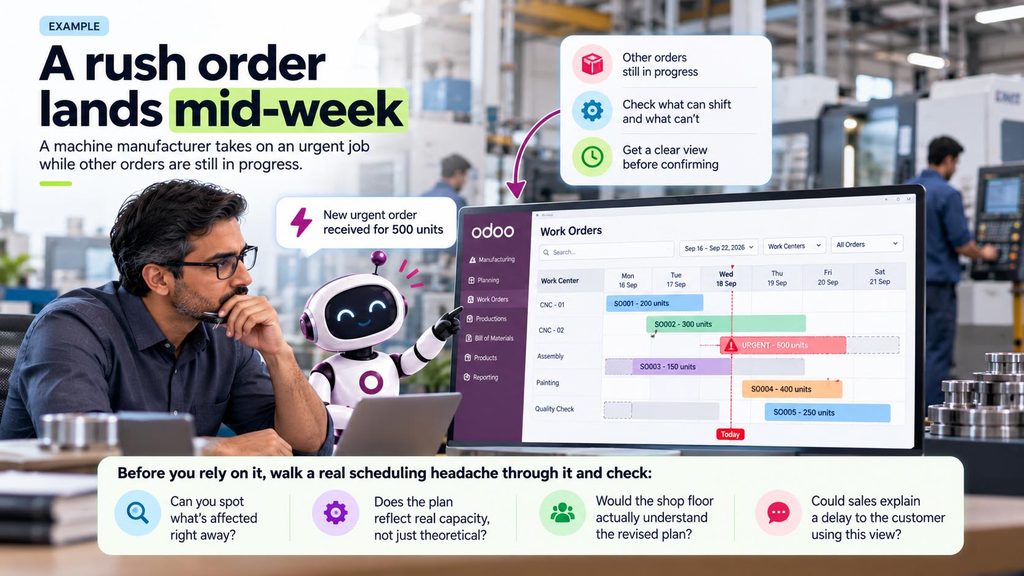
If the answer’s yes to all four, it’s doing its job.
Sales : Fewer “which item do you mean?” moments
Odoo has talked about making it easier to reference a specific line on a quote — clearer numbering that carries through wherever the customer sees it. The exact detail (does it show on the PDF, the portal, or just the internal form?) needs checking against the release notes before you commit to it in writing.
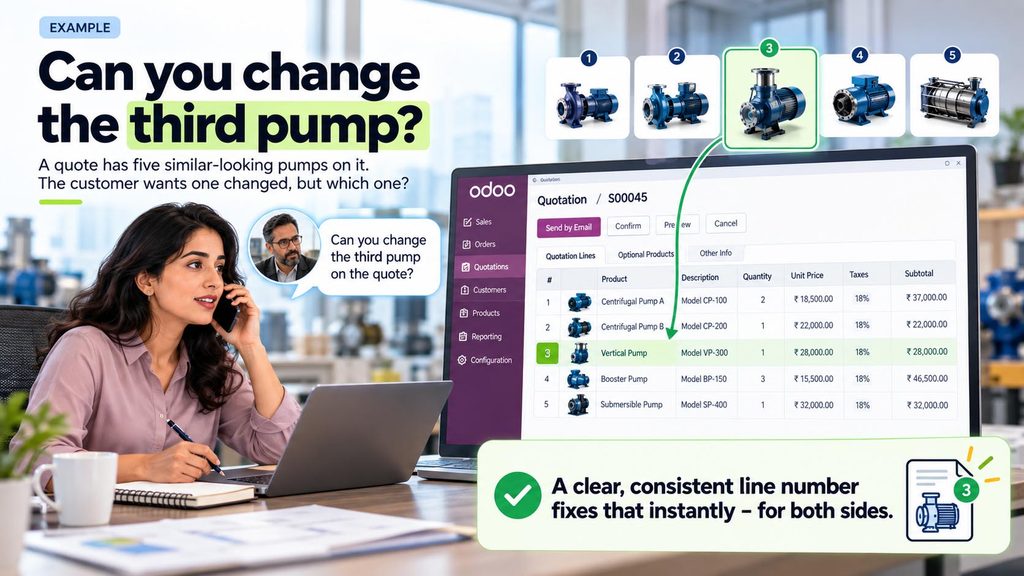
It’s a small feature. But test it on a real, messy quote your sales team would actually send, not a clean four-line example.
Purchase & Inventory : Make better decisions before stock becomes a problem
Barcode improvements are useful, but they aren’t the whole Inventory story.
Odoo 20 also focuses on smarter purchasing and replenishment.
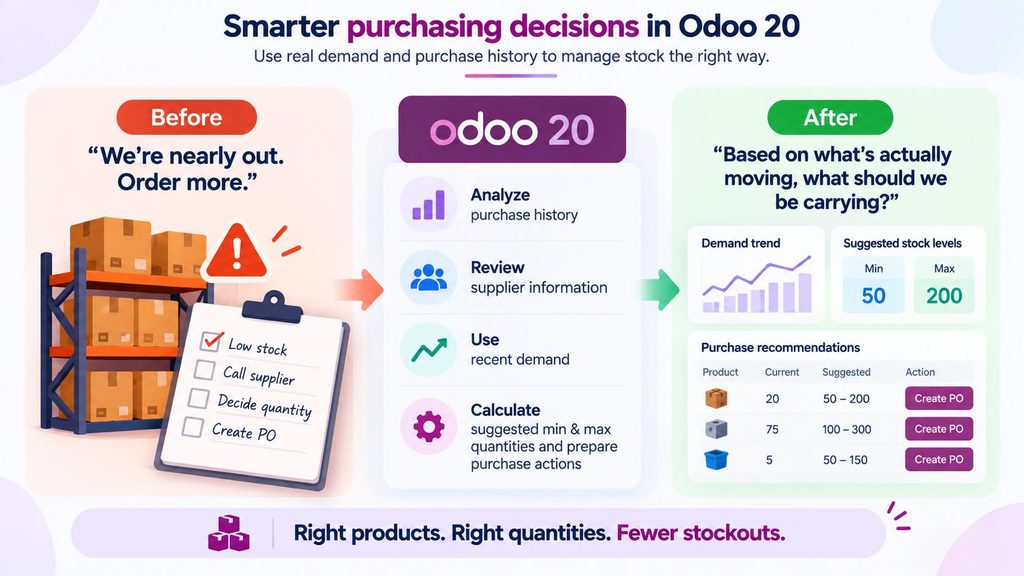
Inventory itself receives a wider range of improvements around packages, receipts, stock handling, replenishment and operational visibility.
Suppose 100 units are arriving and two customers are both waiting.
Does your team know which demand should get those units first?
Can they see the information they need without checking a separate spreadsheet, sales chat and purchase tracker?
Better inventory software doesn’t remove judgement. It gives the person making the judgement better information.
Barcode : Keep the warehouse moving, even when scanning fails
Odoo’s Barcode app usually picks up small workflow fixes each release, including better manual-entry fallbacks for when scanning doesn’t work.
The specifics claimed here – bulk lot numbering, Light User access limits – need direct confirmation against Odoo 20’s actual notes before this section is final.
Treat it as a placeholder, not a published copy yet.
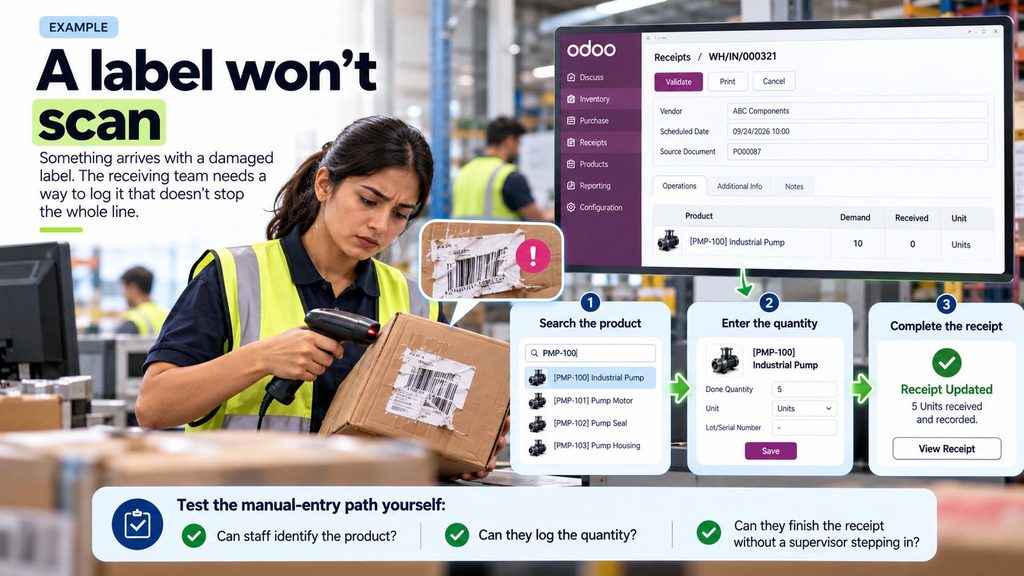
Projects & Service operations : Keep the job moving after the sale
For service businesses, winning the order is only the beginning.
The harder question is what happens next.
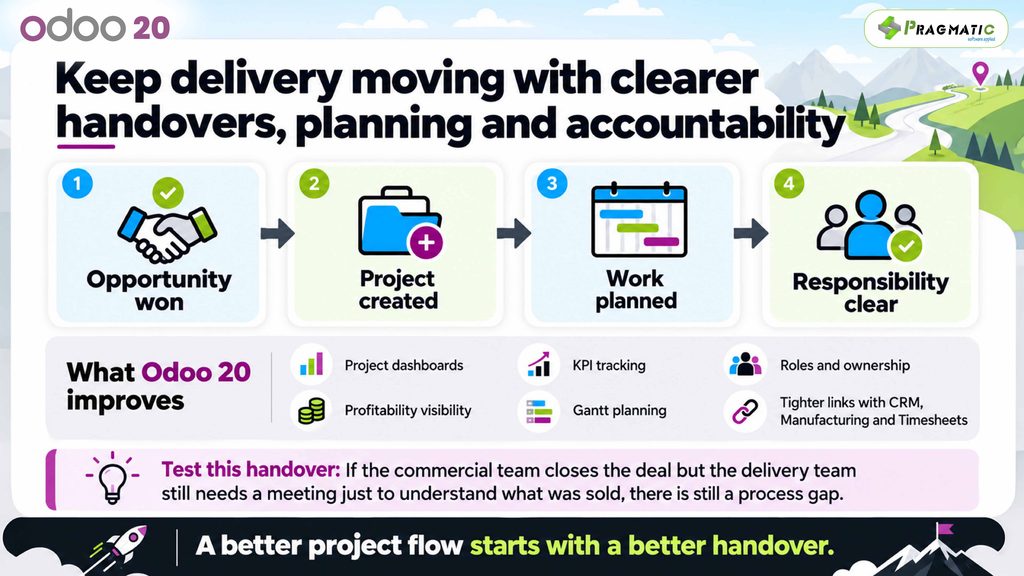
Odoo 20 brings updates across Project, Planning, Field Service, Rental, Timesheets and Helpdesk, with a stronger emphasis on keeping those operational steps connected.
1) Project Planning
2) Field Service
Planning and Field Service are becoming more closely connected.
Odoo 20 adds improvements around technician planning, customer locations, materials and equipment, real-time technician visibility and field operations. Offline support is also part of the service workflow, which matters when technicians are working where connectivity is unreliable.
3) Timesheets
Odoo 20 makes time capture easier and introduces AI-assisted suggestions for work that may belong on an employee’s timesheet.
The employee still reviews those suggestions before they become part of the record.
That is important.
The goal isn’t to have AI invent time. It’s to reduce the number of legitimate hours that disappear because someone forgot to log them.
4) Helpdesk
Helpdesk gets improvements around SLA management, ticket filtering, automations and AI-supported capabilities aimed at helping service teams identify and resolve issues faster.
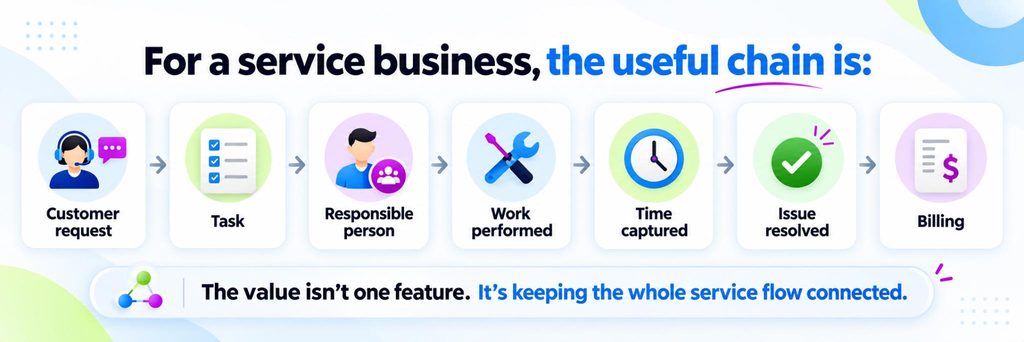
It’s keeping that chain connected.
Website AI : A faster starting draft
Odoo lets you generate a first website draft from a plain-language brief. It’s not brand new – earlier Odoo Online updates already had a version of this – but Odoo 20 continues building on it.
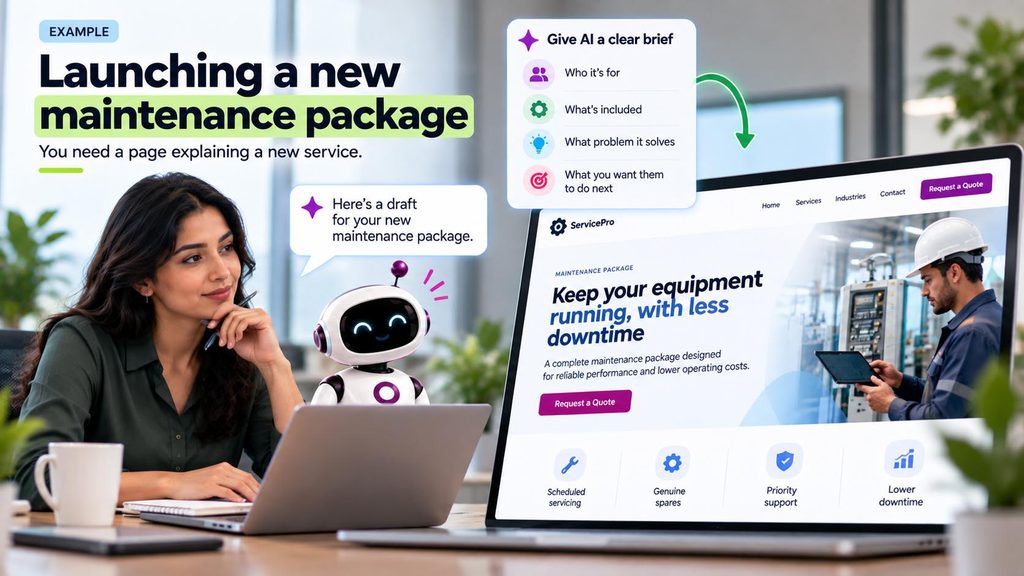
For SEO, start from the question a real customer would type into Google. A page that answers that beats a page full of “best service provider” filler every time.
AI gets you a first draft fast. A clear brief is what makes that draft usable.
eCommerce : More control over what happens after someone clicks “Buy”
Odoo 20 brings a long list of eCommerce updates that affect how products are presented, sold and handled after purchase.
Customers can initiate returns through the customer portal. Products can automatically be published or unpublished based on stock availability. Businesses serving B2B and B2C buyers can configure whether displayed prices include or exclude tax at the pricelist level.

What changes?
The online store becomes less isolated from what happens around it.
Product availability. Ordering. Returns. Reviews. Cross-selling. Abandoned carts.
Those are no longer separate conversations just because the original purchase happened online.
Point of Sale : More flexibility at the counter
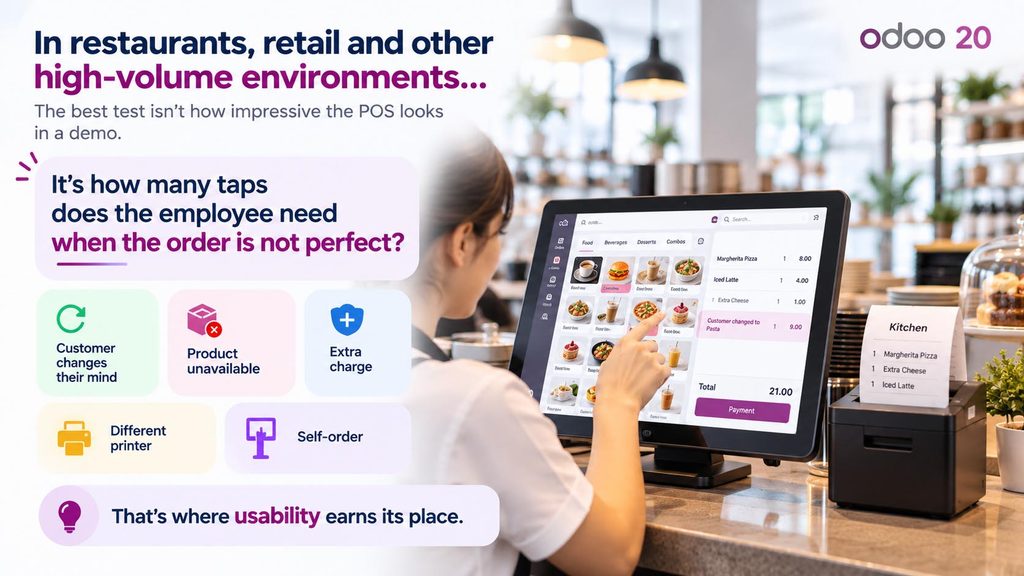
Counter-service businesses experience ERP problems differently.
A five-minute delay that looks insignificant in a back-office process becomes immediately visible when ten customers are waiting.
Odoo 20 includes POS and self-ordering improvements around printer management, service charges, product availability and the ordering experience. The release also continues the move towards simpler stock handling for businesses that don’t require full Inventory complexity.
Marketing : Trigger the next interaction based on what the customer actually does
Marketing gets more useful when it stops treating every contact like a row in the same mailing list.
Odoo 20 continues connecting customer activity across CRM, Website, eCommerce and marketing workflows so that actions can happen in response to what the customer actually does.
This fits the broader Odoo 20 move towards automation.
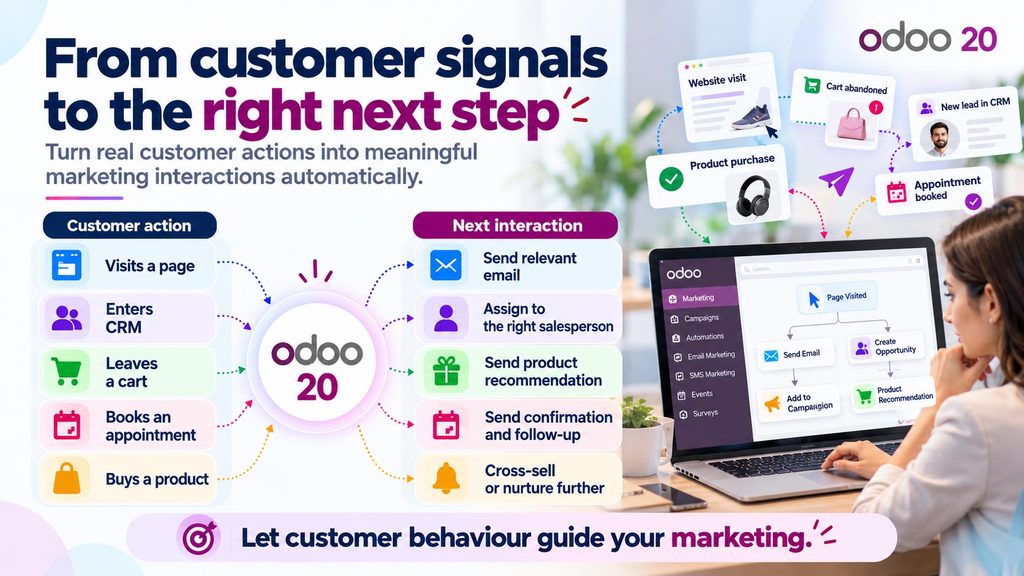
Odoo 20’s release notes include continued improvements across marketing and customer communication workflows, alongside the wider AI and automation platform.
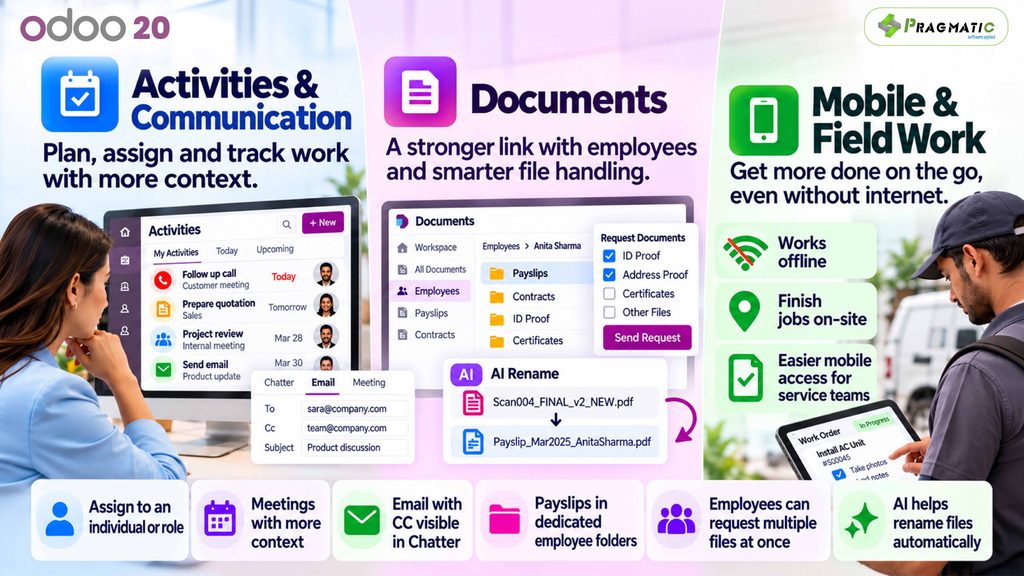
Calendar, Documents, mobile & everyday collaboration
Not every useful Odoo 20 improvement needs to transform an entire department.
Some changes matter because people touch them dozens of times a day.
MCP connectivity : Let your AI tools talk to Odoo
Odoo 20 ships an MCP server.
MCP stands for Model Context Protocol.
In plain terms, it gives an external AI tool a structured way to interact with your Odoo environment instead of you building a completely custom bridge between the AI and ERP.
Odoo’s documentation describes an external AI agent connecting directly to an Odoo database through the MCP server and using exposed tools to read or modify data. Authentication uses an API key, and the available actions depend on what tools or server actions you expose.
That distinction matters.
MCP does not mean “give an AI access to everything.”
A sensible implementation starts with:
What information does this AI actually need?
What is it allowed to change?
Which actions require human approval?
What happens when the request is ambiguous?
What gets logged?
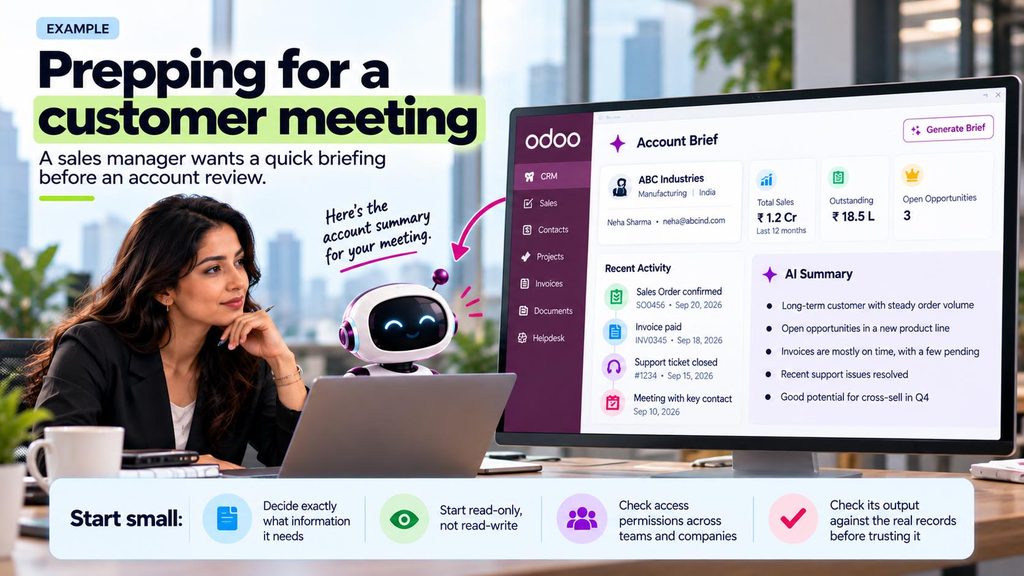
Connecting the tool is easy. Giving it a safe, useful job is the actual work.
What changes under the hood (and why it matters)
Two changes in Odoo 20 won’t show up on a features list, but they matter a lot if you’re upgrading –
Who can see what
Odoo 20 changes parts of the access-control architecture.
If your database relies on significant custom security logic, access restrictions, custom groups or unusual record visibility, don’t assume behaviour will remain identical after migration.
Test the roles that matter.
Salesperson. Sales manager. Accountant. Warehouse operator. HR manager. Portal user. Multi-company user.
Security is one of those areas where:
“The page opened correctly for me”
is not enough testing.
You need to verify who can see what they should see and, equally importantly, what they shouldn’t.
How your books are structured
Accounting architecture has also evolved across recent Odoo releases, including changes around account hierarchy and related financial configuration.
If your chart of accounts, depreciation setup, financial reports or accounting customizations have been heavily adapted, don’t assume the structure simply carries forward without review.
Test it in staging.
Reconcile the migrated results.
Compare reports.
Then pick the go-live date.
Neither of these changes is a reason to avoid Odoo 20.
They’re reasons to understand your current setup before upgrading it.
Should your business upgrade to Odoo 20?
Upgrade when the new stuff actually solves something you have and your team’s ready to use it.
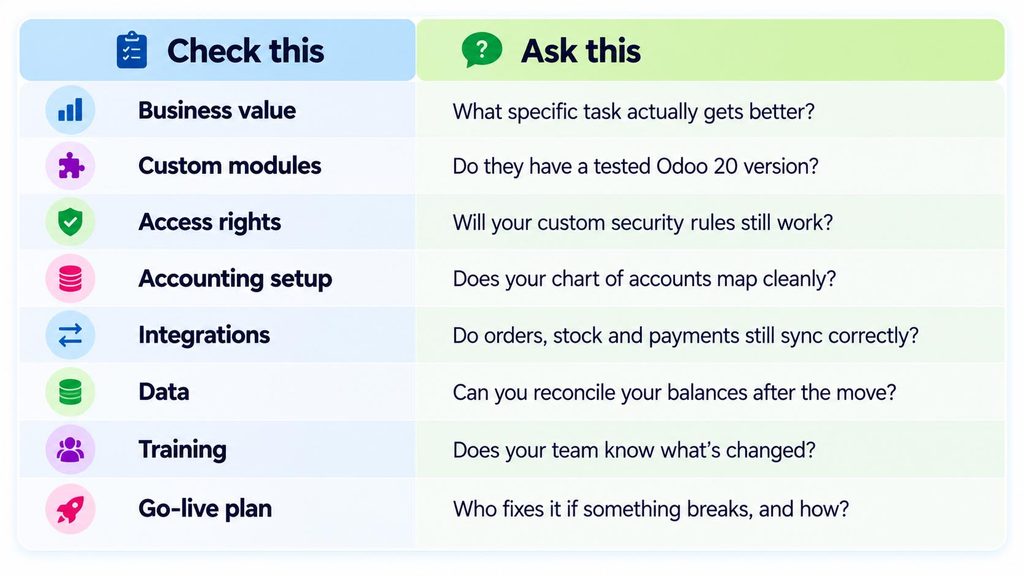
Test the awkward cases, not just the smooth ones : A partial delivery, a return, a messy customer record, an integration that has to retry.
Those are the moments that show whether the system actually holds up.
Let’s figure out what Odoo 20 does for you
Odoo 20 opens up real automation and everyday improvements – alongside some structural changes worth testing carefully first. The best case for upgrading starts with a problem your team can actually name.
At Pragmatic Techsoft, we’ve been doing this for 17+ years, across 400+ projects in 50+ countries.
Consulting, implementation, customization, integration, migration and support – all of it.
Bring us the process that still eats up too much time in reminders and spreadsheets.
Let’s figure out what Odoo 20 could actually fix.
📧Email us your queries on su*****@*********co.in
FAQs about Odoo 20
What’s actually new in Odoo 20?
Odoo 20 introduces a broad range of improvements across AI automation, CRM, Accounting, HR and Payroll, Sales, Inventory, Manufacturing, Barcode, services, eCommerce, POS, marketing and collaboration tools.
Some of the most significant themes are AI agents that can perform actions, Accounting AI, smarter purchasing and replenishment, redesigned Payroll workflows, stronger service operations and external AI connectivity through MCP.
Is everything in Odoo 20 actually new?
Not necessarily for every user.
Some features arrived progressively through earlier Odoo Online updates before the final Odoo 20 release. What feels new depends on the version and deployment you are currently using.
Do Odoo 20’s AI features cost extra to run?
Yes. Odoo’s official Odoo 20 release notes state that AI features require credits purchased via IAP. Businesses planning high-volume AI automations should therefore consider usage costs as part of the business case.
Does Odoo 20 have new CRM features?
Yes. Odoo 20 expands the wider CRM and AI workflow, including ways to bring prospects into the pipeline and automate what happens once a lead or opportunity is created.
What’s new in Odoo 20 HR and Payroll?
Odoo 20 introduces significant Payroll changes including a redesigned dashboard and Payrun workflow, salary simulation, more flexible working schedules, configurable payslip delivery and stronger interaction between Attendance, Time Off and Payroll.
What’s new in Odoo 20 Inventory?
Odoo 20 continues improving purchasing, stock planning, replenishment, receiving, package handling and warehouse processes. Odoo also highlights smarter stock-level recommendations based on recent demand.
What’s new for service businesses in Odoo 20?
Project, Planning, Field Service, Rental, Timesheets and Helpdesk all receive improvements. These include better project management, field planning, technician visibility, easier time capture and smarter support workflows.
What is MCP in Odoo 20?
MCP, or Model Context Protocol, allows compatible external AI agents to connect to an Odoo database and use approved tools to read or modify information. The actions available depend on the tools and permissions configured for that connection.
Will my custom security rules still work after upgrading?
Custom security should be tested directly rather than assumed to behave identically.
If your Odoo environment contains custom roles, access logic or record restrictions, verify them against a staging copy before production migration.
Will my chart of accounts carry over?
It should be treated as a migration item to validate, especially if your accounting configuration has been customized.
Review the migrated chart, mappings, asset/depreciation handling and financial reports against your actual setup before go-live.
How much does upgrading to Odoo 20 cost?
There’s no universal number.
The effort depends on your current Odoo version, custom modules, integrations, volume and quality of data, functional changes, testing requirements and the amount of user training needed.
Should I upgrade to Odoo 20 immediately?
Not simply because it’s the latest version.
The better question is whether the new capabilities provide enough operational value to justify the migration and whether your current customizations, integrations and users are ready for the change.
How can Pragmatic Techsoft help?
We can assess your existing Odoo environment, identify what Odoo 20 changes for your specific processes, review customizations and integrations, plan the migration, test critical workflows and support your team through go-live.