

The first 90 days decide more than the go-live date
An ERP project can look busy without becoming clearer.
There may be workshops, spreadsheets, demonstrations, tickets and weekly calls.
But after three months, management still cannot answer a basic question : Are we building the right operating model?
The first 90 days should remove uncertainty. They should reveal how the business actually works, where departments disagree, which requirements Odoo can handle as standard, what must change and what users will need to do differently.
This period is not simply about setting up applications. It is where assumptions become decisions.
For a growing company, that work matters more now than it did a few years ago. Businesses are trying to automate approvals, use AI, connect ecommerce and customer channels, improve traceability and obtain faster management visibility. If the underlying records and responsibilities are unclear, automation only moves bad information faster.
Here is what a well-run first 90 days should look like.
Before day one : The work that prevents a false start
The project should have named the owners before kickoff.
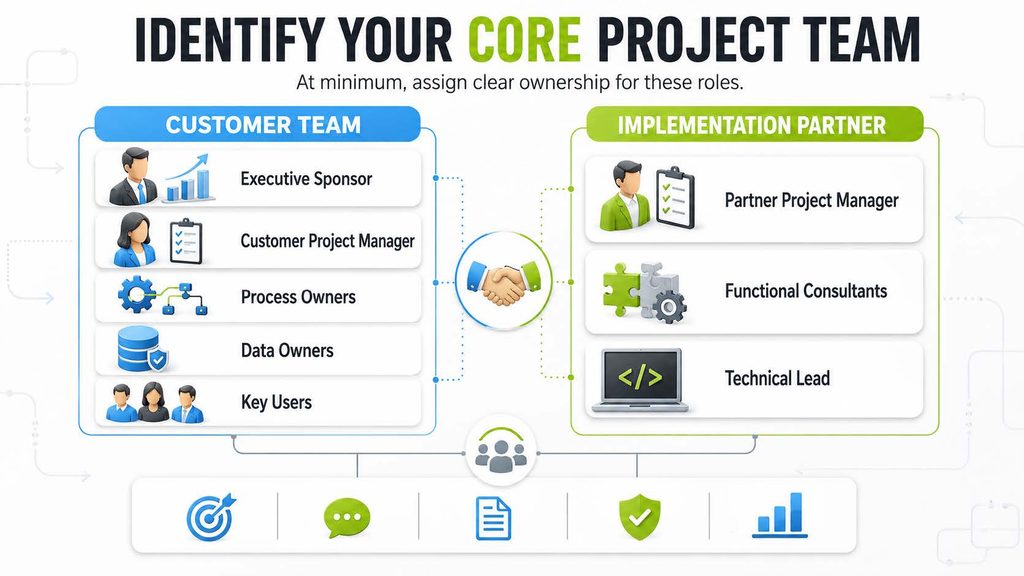
The team should also agree on scope, decision rules, meeting cadence, documentation location, issue handling and change control.
This may sound administrative, but ERP projects slow down when nobody knows who can approve a workflow or where the latest decision was recorded.
The customer should prepare representative documents and data. These might include quotations, POs, invoices, BoMs, stock reports, project budgets, approval matrices and management reports.
The purpose is not to produce perfect documentation. It is to give the consultants evidence of how the operation works today.
Days 1 to 30 : Understand the operation
The first month should be dominated by discovery.
- Follow complete business journeys
Instead of reviewing one department at a time in isolation, follow transactions across departments.
For manufacturing
1. How does customer demand enter the business?
2. Who confirms feasibility and delivery?
3. Which BoM and routing apply?
4. How are materials planned and purchased?
5. How is production released?
6. Where are quality checks performed?
7. How are scrap, rework and downtime recorded?
8. When does the finished product enter stock?
9. How is it dispatched and invoiced?
10. How does management see actual margin?
For construction
1. How is the tender estimated?
2. How does the BOQ become a project budget?
3. Who requests and approves materials?
4. How are materials received and issued at site?
5. How is subcontractor work measured?
6. How is progress certified?
7. How is the RA bill prepared?
8. When are costs and revenues visible?
Cross-functional journeys expose handoffs. Those handoffs are where duplicate entry, waiting and missing accountability usually live.
- Separate symptoms from causes
A customer may say, “Inventory is inaccurate.” The cause might be unrecorded production consumption, late receipts, unrestricted adjustments, incorrect units of measure or site material transfers managed outside the system.
Configuring an inventory dashboard will not fix those causes.
Consultants should keep asking what happened immediately before the problem became visible.
- Establish success measures
Success measures should be practical.
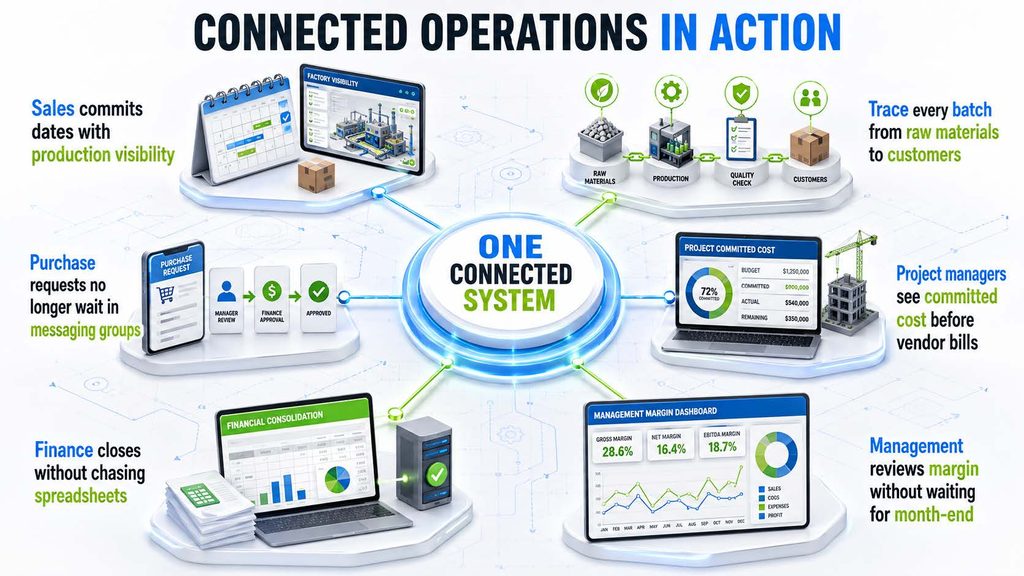
By day 30, the team should have an agreed view of the current state, major problems, target processes, data risks and priority outcomes.
Days 31 to 60 : Turn requirements into working decisions
The second month converts discovery into solution design and early prototypes.
1) Run fit-gap analysis
Each requirement should be compared with current Odoo 19 capability.
For example,
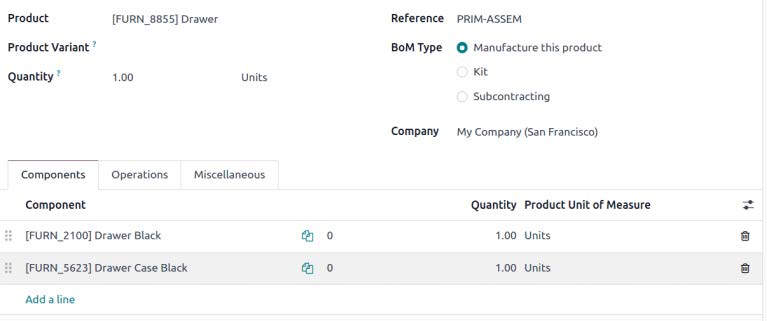
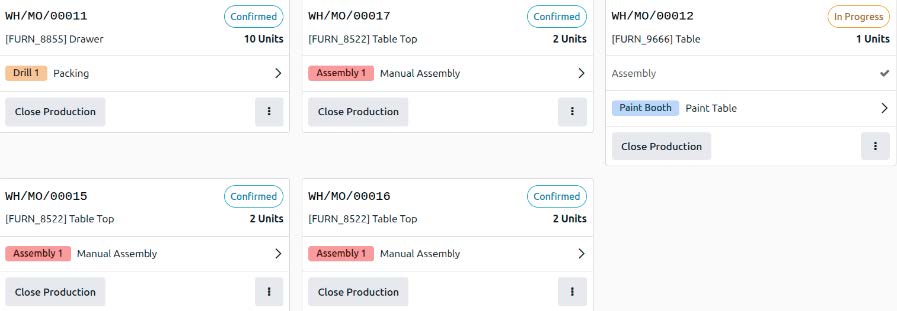
Odoo can support manufacturing orders
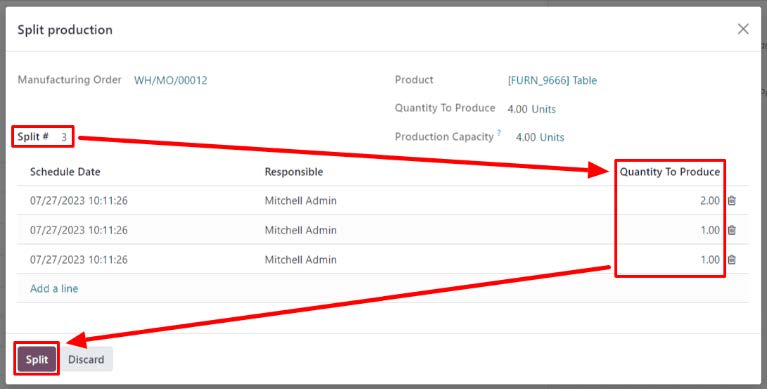
BoMs

Work centres
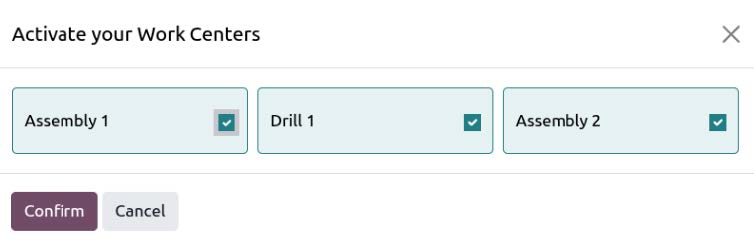
Operation dependencies
Shop Floor execution
Quality checks, lots and serial numbers, expiration dates and expected versus real manufacturing costs – and well so much more!
These capabilities may cover much of a manufacturer’s requirement through configuration.
Construction-specific processes such as advanced BOQ control, labour requisitions, task completion, RA bills and specialized contracting reports are not simply standard project features.
They may require Pragmatic’s Construction Bundle Advanced or project-specific extensions.
This distinction should be documented clearly.
2) Prototype the difficult processes first
Do not begin with the easiest screen. Prototype the workflow with the highest risk or uncertainty.
If the manufacturer has complex product variants, demonstrate the relevant BoM and routing approach. If the contractor’s greatest pain is BOQ-to-billing continuity, demonstrate how the BOQ, WBS, requisition, completion and RA bill will connect.
Early prototypes allow users to react to something concrete.
3) Confirm data rules
The team should decide –
- Product coding convention
- Units of measure
- Customer and supplier duplication rules
- BoM version ownership
- Warehouse and location structure
- Lot and serial conventions
- Analytic account structure
- Opening balance date
- Required history
These are business decisions.
A migration template cannot decide them automatically.
4) Define integrations properly
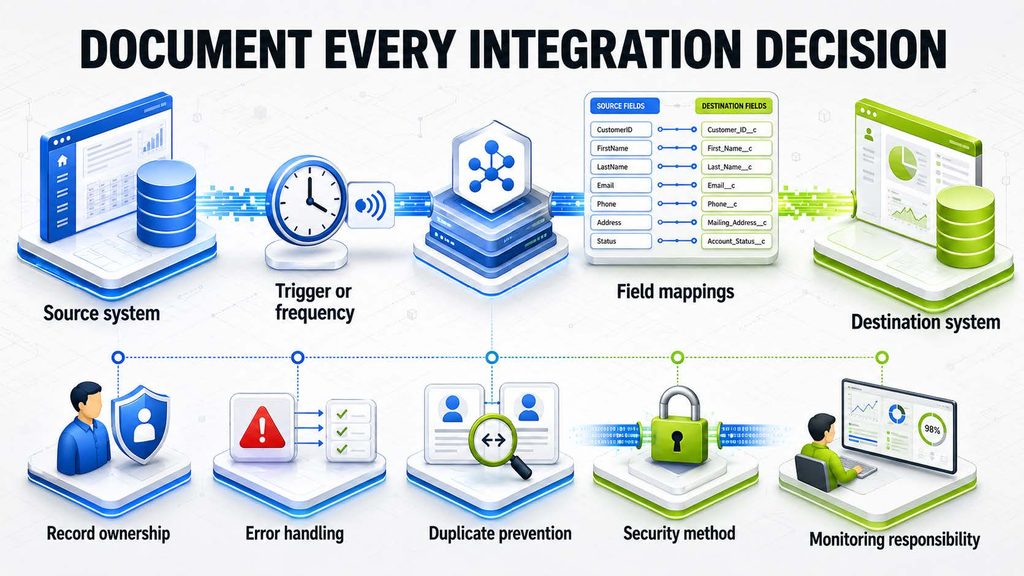
By day 60, the project should have an approved solution direction, prioritized development list, data templates, early prototypes and a credible delivery plan.
Days 61 to 90 : Prove the process with real scenarios
The third month should move from design confidence to operational proof.
1) Configure complete journeys
The team should demonstrate connected scenarios using realistic products, customers, projects and approvals.
A manufacturing demonstration should not stop when the MO is created. It should continue through component availability, work orders, actual time, quality, scrap, finished stock and costing.
A construction demonstration should not stop at task creation. It should show how site demand influences procurement, stock, completion, billing and project profitability.
2) Run the first migration rehearsal
Test data should be loaded early enough to expose issues. Users should validate codes, quantities, balances and relationships.
For example, a BoM may upload successfully but fail operationally because components use inconsistent units. A customer may exist but lack the tax or delivery data required for invoicing. A project balance may load but not connect to the correct analytic account.
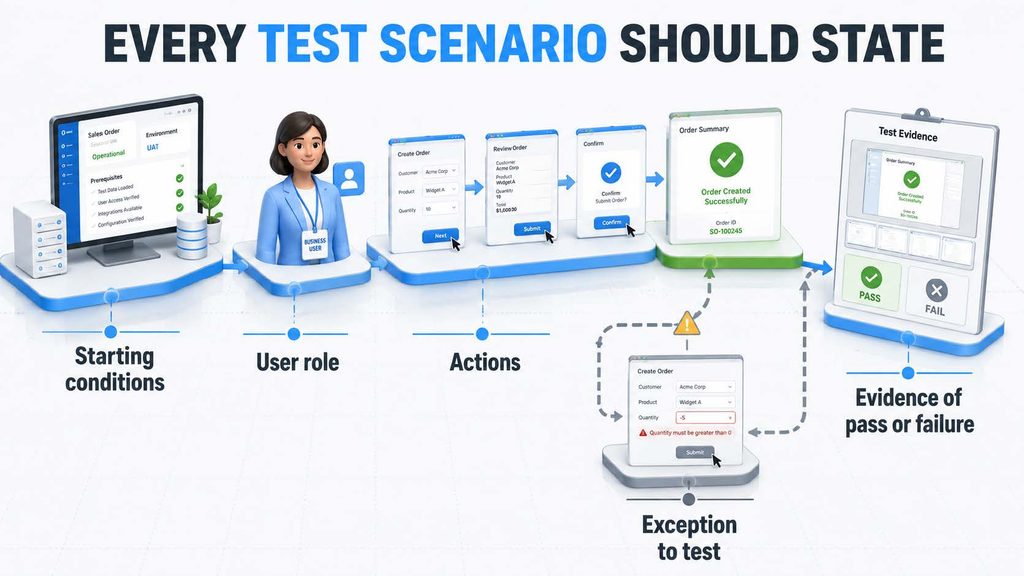
3) Prepare UAT scenarios
Users should know exactly what they need to test.
4) Start role-based training
Training should begin before the final UAT. Key users need enough confidence to test independently and explain the new workflow to their teams.
5) Review adoption risks
Ask where people are likely to return to spreadsheets, messages or paper. Common causes include slow entry, unclear responsibility, missing mobile access, reports users do not trust and controls that feel disconnected from actual work.
By day 90, management should not expect the entire project to be complete in every case. It should expect the major design questions to be resolved and the core workflow to be visible, testable and credible.
What management should see by day 90
Management should receive a concise view of :
🎯Confirmed scope
🎯Process maps
🎯Standard versus custom requirements
🎯Working prototypes
🎯Data readiness
🎯Integration status
🎯Decisions pending
🎯Risks and mitigation
🎯UAT plan
🎯Training plan
🎯Go-live forecast
🎯Budget and change status
If leadership sees only a percentage-complete slide, it cannot judge whether the project is genuinely healthy.
What users should experience by day 90
Key users should recognize their work in the system.
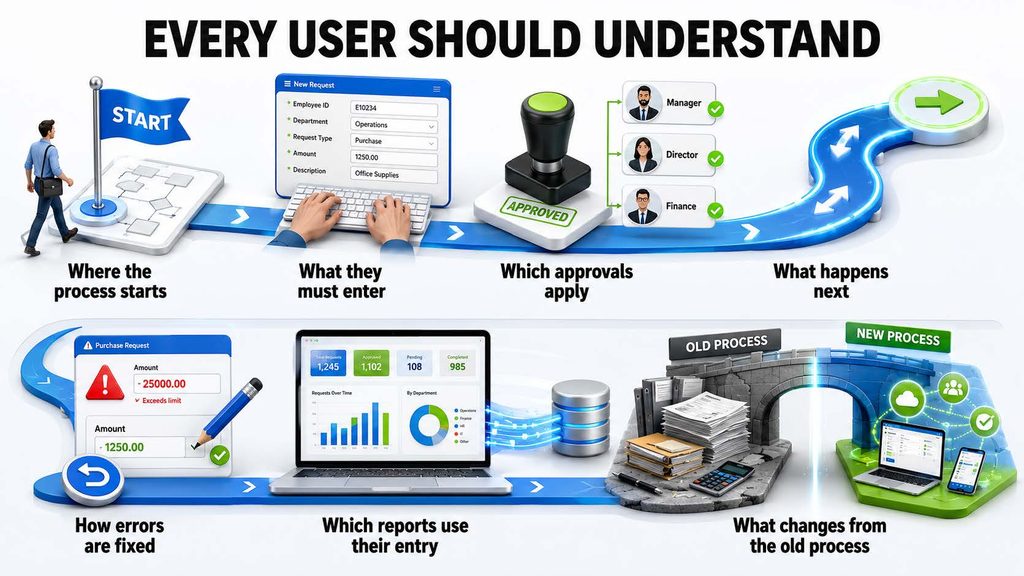
The goal is not full mastery. It is enough familiarity to test honestly and identify real gaps.
Common mistakes during the first 90 days
1) Starting configuration before process alignment
This creates rework because the team builds while fundamental decisions remain open.
2) Designing only for the happy path
Returns, partial receipts, scrap, rejected quality checks, cancelled orders and price changes are part of the process.
3) Leaving data until the end
The system cannot be properly tested with placeholder data alone.
4) Treating every request as mandatory
Prioritize requirements according to risk, value and go-live necessity.
5) Excluding users until UAT
Late involvement creates resistance and reveals usability problems too close to launch.
6) Measuring activity instead of decisions
More meetings do not mean more progress. Track resolved workflows, approved designs, migrated data and passed scenarios.
Build confidence before speed
The first 90 days should give the organization confidence that the implementation is based on reality.
That confidence comes from understanding workflows, making difficult decisions, proving the design with working scenarios and involving the people who will use the system.
ERP should reduce dependency, not create more of it. A disciplined first 90 days is how the project begins transferring knowledge and control into the organization instead of leaving everything with consultants.
Pragmatic Techsoft uses discovery, iterative demonstrations, fit-gap analysis and role-based validation to bring business and system decisions together.
If your current ERP project is active but still unclear, an implementation health review can identify what is missing before the uncertainty reaches go-live.
Frequently asked questions
1. Will every Odoo project be ready for go-live in 90 days?
No. Some focused projects may go live within that period, while complex programmes will take longer. By day 90, the core design and risks should at least be clear.
2. Who should attend discovery workshops?
Process owners and representative users from every affected function, along with the executive sponsor for cross-functional decisions.
3. What is a fit-gap analysis?
It compares business requirements with standard Odoo capability and identifies what can be configured, what requires process change, and what needs an application, customization or integration.
4. Should development begin during discovery?
Limited prototyping may help clarify requirements, but major development should wait until the relevant workflow and acceptance criteria are sufficiently understood.
5. When should data migration start?
Data assessment and cleansing should begin in the first month. Trial migration should occur early enough to influence design and testing.
6. What should management do if progress is unclear after 90 days?
Request a health review covering scope, decisions, prototypes, data, integrations, UAT, risks, adoption and remaining effort. Activity alone is not evidence of readiness.