
What needs to work after the switch?
Your accounts team opens Odoo on the first working day after migration. A customer calls about a part-paid invoice. The warehouse needs to dispatch an outstanding order. A supplier asks which payment is due.
Can each person find the right information and continue their work?
That is the practical test of a Tally to Odoo migration.
Moving from Tally to Odoo involves more than transferring records.
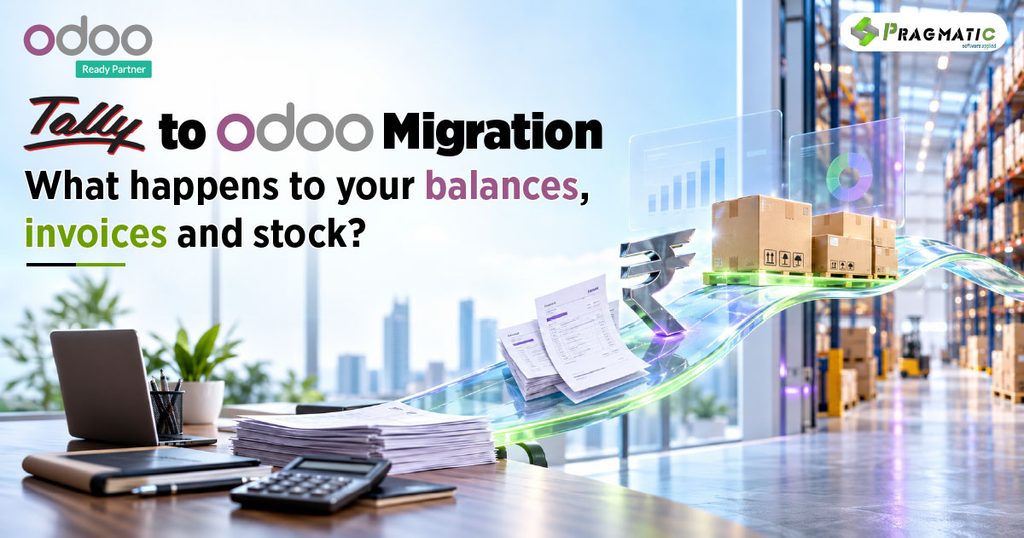
Your team needs a reliable starting position : What customers owe, what you owe suppliers, what stock is available and which transactions still need attention.
This guide explains what to migrate, what to check and how to prepare for the handover.
The move involves selecting data, mapping it to Odoo’s structure, importing it and validating the result. It also requires decisions about historical records, opening balances and transactions that cross the handover date.
For business owners, the objective is clear :
Connect more of the business without losing control of the position you already have.
Do you need to replace Tally or can you connect it with Odoo?
Moving to Odoo does not always mean stopping Tally. You can also connect the two systems, with each handling an agreed part of the business.
For example, a business may use Odoo for sales, purchasing and inventory while retaining Tally for accounting.
The integration then needs to transfer the agreed information between them without creating duplicate entries or conflicting records.
Pragmatic Techsoft – an official Odoo partner has experience integrating Tally with Odoo to support connected business workflows.
Whether this approach suits your business depends on the workflows you want to connect and where each record should be maintained.

💡Keeping both systems can suit a business that wants to retain its accounting setup while connecting more operational work. A full migration may suit a business seeking to bring those activities into Odoo.
Unsure which route fits? Discuss your current workflow with Pragmatic Techsoft before deciding what to migrate or integrate.
🎯If you decide to move accounting into Odoo, the next step is to establish what data must move, what can remain archived and how the opening position will be checked.
What data should you migrate from Tally to Odoo?
Start with what the business needs to operate from the agreed cutover date, the point when responsibility moves to the new system.

Not everything needs to move in the same way. Loading years of history adds mapping and validation work.
Finance should approve the historical scope, reporting needs and record-retention arrangements before migration begins.
Also check whether important operational data sits outside Tally, such as open-order details maintained in spreadsheets.
How does Tally data become usable in Odoo?
A Tally export is the starting material for migration.
It still needs to be prepared for Odoo.
👉TallyPrime supports exports in formats including Excel, XML and JSON.
👉Odoo’s documented import tools support Excel and CSV.
Sharing a file format does not mean the two systems organize information identically.
Create a mapping register that records the source field, destination, conversion rule, responsible person and validation check.
For example
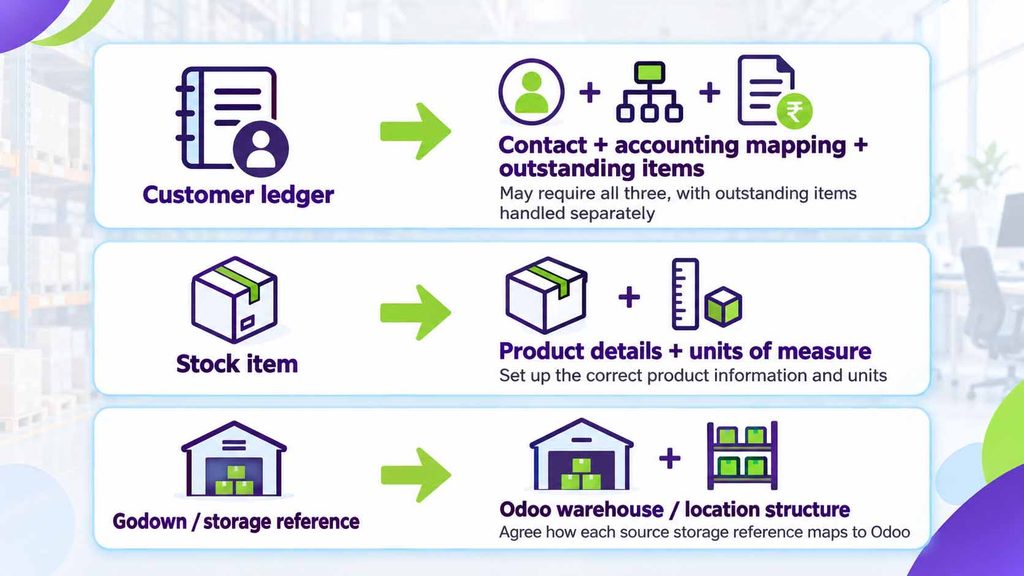
Use consistent identifiers to connect related records. Odoo External IDs can support relationship mapping and updates to previously imported records when used correctly. They do not replace reconciliation.
Test a representative sample before processing the full dataset.
What happens to unpaid and part-paid invoices?
The migration should preserve the information your team needs to collect or settle each outstanding amount.

A single customer balance may preserve the total while losing useful invoice-level detail.
There is also a duplication risk : Bringing across invoice balances and separately including the same receivable in opening entries can overstate what is owed.
Finance and the implementation team should agree on the treatment of unpaid invoices, advances, credit notes and payments before loading the opening position.
How should opening stock and valuation be checked?
Stock quantity and stock value need separate checks.
A total of 500 units does not establish whether those units are in the correct location, measured consistently or valued appropriately.
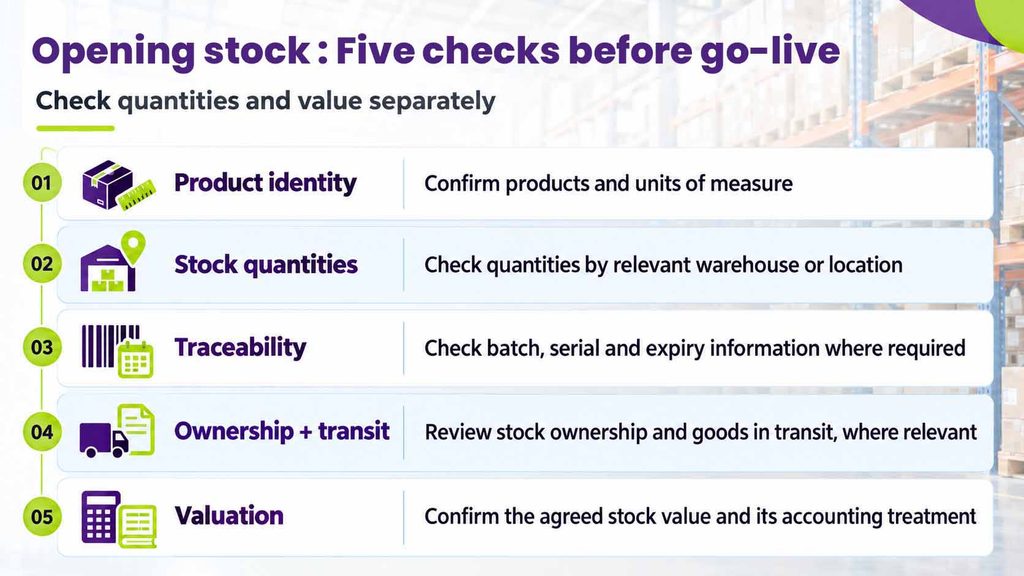
Importing product records alone does not establish opening inventory.
The inventory-loading method must suit the chosen Odoo version, configuration and costing approach. Finance and warehouse teams should reconcile the agreed opening quantity and value at the same cutover point.
Any difference should have an explanation and an owner before sign-off.
What must be tested before go-live?
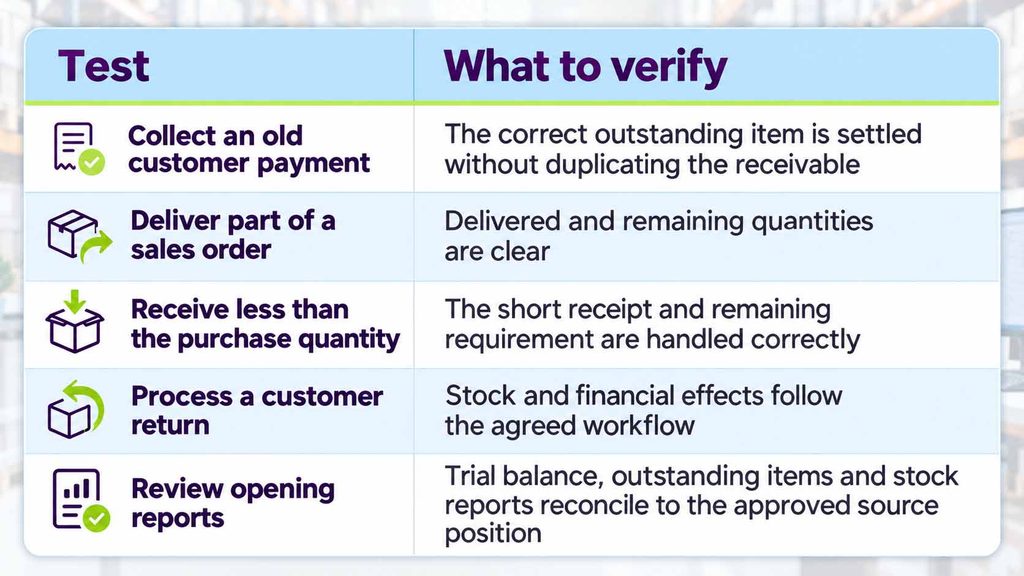
Passing an import check confirms that the file meets import requirements. Business acceptance must also establish that people can complete their work correctly.
Rehearse a sale with partial delivery, a purchase receipt with a discrepancy, a customer return and settlement of an old invoice. Compare the agreed trial balance, outstanding items, stock quantities and valuation at the same cutover point. Record every difference, its cause and its owner.
For Indian businesses, include GSTINs, relevant tax mappings, HSN/SAC information and applicable invoicing workflows. Odoo provides Indian localisation functionality, but data import alone does not configure or validate it.
Historical records also need careful handling so that they do not unintentionally trigger new operational actions, customer communications or external submissions.
Business acceptance needs more :
A user must be able to complete the transaction and explain its financial and stock effects.
Can Tally and Odoo run together during migration?
Yes.
During a planned migration, you may keep both systems active for a defined transition period. Agree which system owns each transaction type, who reconciles the records and when the temporary arrangement will end.
Do not assume that both systems synchronize automatically. The transfer method and its limitations need to be established and tested.
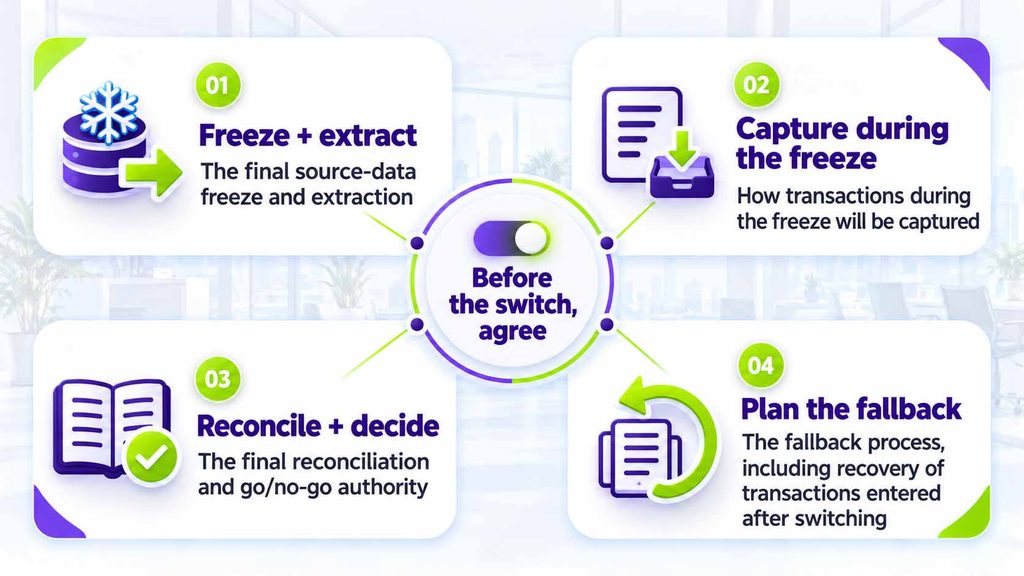
A temporary arrangement also needs a review point. Otherwise, duplicate entries can become a permanent operating habit.
What affects migration cost and timeline?
The main drivers are data quality, scope and complexity.
Multiple companies, warehouses, historical transactions, custom fields, integrations and unresolved balances all increase the work involved. User availability for testing and sign-off also affects the schedule.
💡Ask for an estimate that distinguishes data preparation, migration, reconciliation, user testing and post-go-live support.
A trial migration provides better evidence for planning than record count or user count alone. Avoid treating a successful sample import as proof that the full business handover is complete.
Take the next step with a clear plan
Whether you move from Tally to Odoo or connect both systems, start by defining where each transaction belongs, how balances will be checked and how your team will continue its daily work.
Pragmatic Techsoft helps businesses plan and implement Odoo migrations and integrations around their accounting and operational needs. Our approach covers data mapping, validation, workflow testing and knowledge transfer, so your team understands both the records and the processes it will use.
💡Considering a change?
Bring us your current Tally setup, the workflows you want to connect and your biggest concern.
🤝We can help assess the right approach and what it will take.
Book a free 30-minute consultation with our Odoo & Tally experts at Pragmatic Techsoft
Frequently asked questions
Can we migrate from Tally to Odoo during the financial year?
Yes, with an agreed cutover date and accounting design. Finance must approve opening balances, year-to-date reporting requirements and the treatment of transactions spanning the changeover.
Must every historical Tally transaction move into Odoo?
No. Decide which history needs to be available inside Odoo and which can remain in an accessible archive. Confirm retrieval, reporting and retention requirements before finalising scope.
Is a Tally-to-Odoo connector compulsory?
Not necessarily. A one-time migration may use prepared imports or another agreed migration method. Ongoing integration is a separate requirement and needs its own compatibility and workflow checks.
What if Tally does not contain reliable bill-wise outstanding details?
Identify the gap before migration. Reconstruct and validate the required detail where possible, or agree and document the limitations of the opening information with finance.
Can we keep Tally after moving to Odoo?
Yes, subject to the access and licensing arrangements retained. Define whether it remains an archive or an active system and establish controls against unintended duplicate entry.