

You know what the software offers. But do you know what your business needs?
You’ve started a business. Customers are coming in, orders are growing and the small team that once managed everything through spreadsheets, emails and WhatsApp is beginning to feel the pressure.
Someone suggests getting a CRM. Your accountant recommends accounting software. Another business owner tells you to invest in an ERP before operations become too complicated.
So you start researching.
Odoo, Zoho, SAP, Microsoft Dynamics, ERPNext, HubSpot, QuickBooks and countless other solutions appear in your search results. Every platform promises some combination of efficiency, automation, visibility and scalability.
The demonstrations look impressive. The features sound useful. The subscription prices seem manageable.
But here’s the question that rarely gets enough attention –
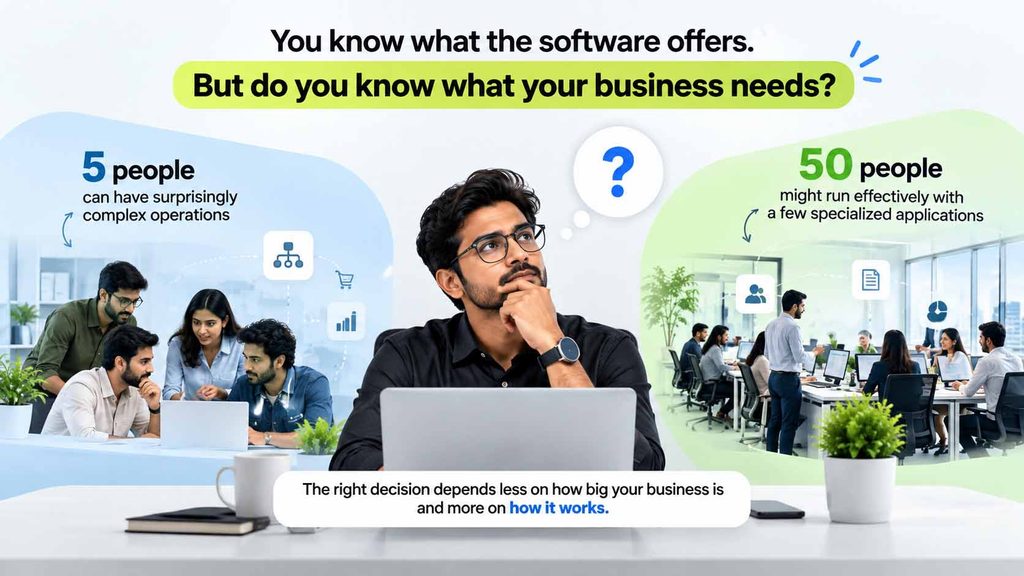
And getting that decision wrong doesn’t always mean buying poor software. Sometimes it means buying perfectly capable software that doesn’t match the problems you’re trying to solve.
Before you compare subscription plans, book another demonstration or commit to an implementation, these twelve questions will help you make a more informed decision.
What problem are you actually trying to solve?
“We need better software.”
That’s often how the conversation begins. But better at what?
Consider a small distribution business where inventory figures rarely match what the warehouse actually holds. The founder begins searching for inventory management software.
But during an internal review, the business discovers something interesting.
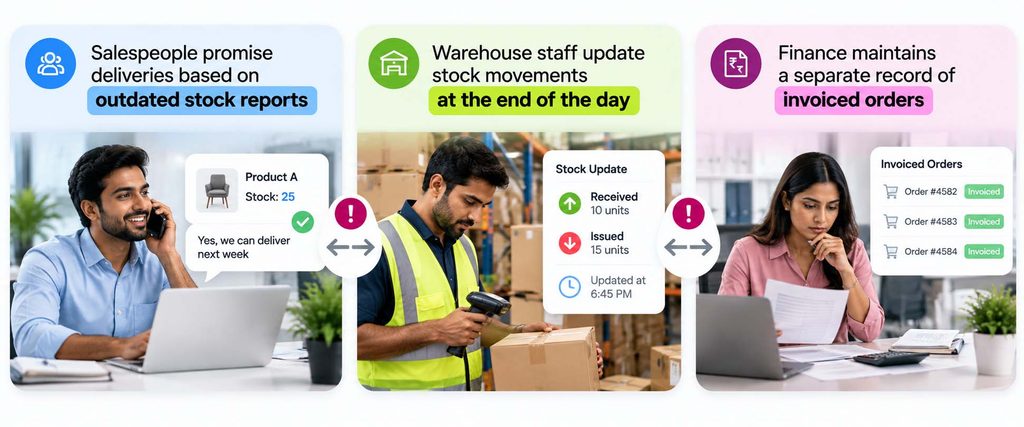
The issue isn’t necessarily a lack of inventory functionality. It’s that several processes depend on information that isn’t being updated consistently.
Now consider a consulting startup struggling to follow up with potential customers. Its biggest problem might be resolved through a properly configured CRM rather than an entire ERP implementation.
These businesses need different solutions because they’re trying to solve different problems.
Before evaluating software, identify your three most pressing operational challenges. Understand how frequently each occurs, who is affected and what the consequences are.
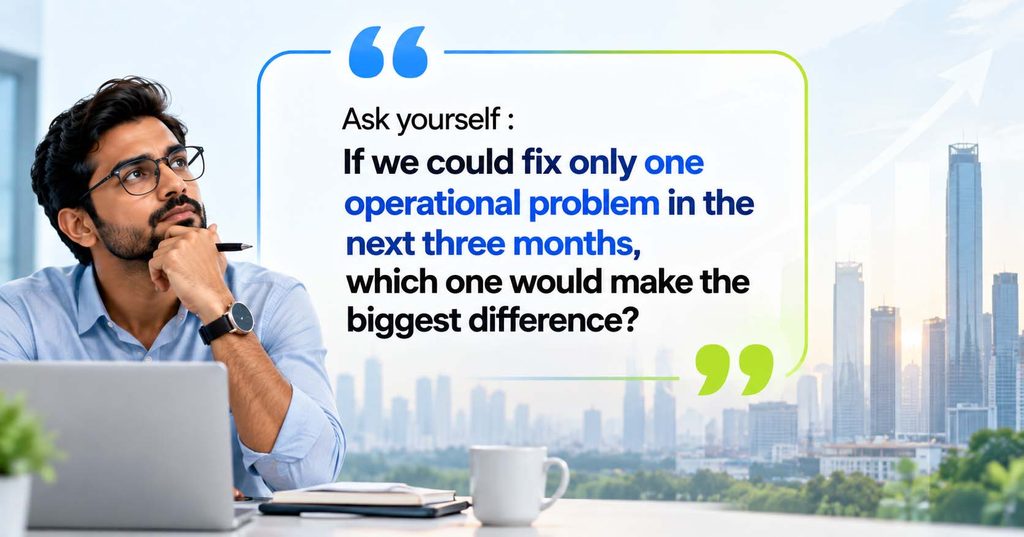
That answer is a much stronger starting point than a list of software features.
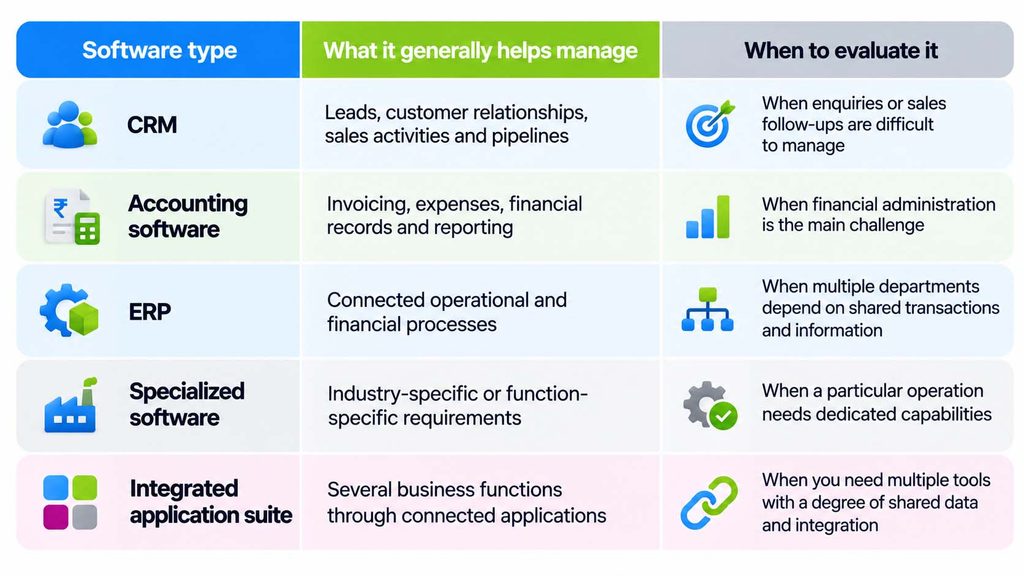
Do you need an ERP, CRM or accounting software?
One of the first decisions is whether your business needs specialized software or a system that connects several functions.
A CRM primarily helps manage customer information, enquiries, sales pipelines and follow-ups. Accounting software focuses on financial records, invoicing, payments, expenses and reporting. ERP software brings broader operational processes together, potentially connecting purchasing, inventory, sales, accounting, manufacturing and other functions.
However, modern software categories overlap. Some accounting platforms offer inventory capabilities, CRM products can include sales automation, and application suites can connect several business functions.
For example, a small consulting business may need CRM, project management and invoicing.
A manufacturer may need to connect customer orders, bills of materials, purchasing, production, inventory and costing.
The difference isn’t simply that one company is larger. It’s that one operation involves more interdependent processes.
Don’t ask whether ERP is better than CRM. Ask whether your business needs individual tools or connected workflows.
Which features matter today and which can wait?
Founders naturally think ahead.
You may have one warehouse today but plan to open several more. You may employ five people now but expect to build a much larger team.
Those ambitions should influence your software selection.
They shouldn’t automatically determine your implementation scope.
Imagine a startup selling products online. Today, it needs to process orders, track inventory, manage suppliers and issue invoices.
In the future, it may need multiple warehouses, advanced replenishment planning and more detailed financial reporting.
Choosing software that can potentially accommodate those requirements makes sense. Implementing everything immediately may not.
A practical way to prioritize is to classify requirements into three groups :
- Must-have now : Capabilities required to run today’s operations reliably
- Next phase : Capabilities realistically expected within the next 12 to 18 months
- Future possibilities : Requirements linked to longer-term expansion
This approach helps you avoid two extremes 👇
Choosing a solution you’ll quickly outgrow or introducing unnecessary complexity before your team is ready.
A phased implementation can be useful, provided the first phase accounts for important dependencies. For instance, inventory and invoicing may need to be considered together even if certain advanced warehouse functions are introduced later.
Start with what your business needs to operate well. Design with growth in mind.
Are your business processes ready for software?
Sometimes the biggest problem isn’t technology.
It’s the process the technology is expected to support.
Consider a growing company where purchasing decisions are inconsistent.
One employee orders materials whenever stock appears low. Another waits for management approval. A third purchases directly from a familiar supplier because the usual process takes too long.
Management decides to introduce purchasing software.
But who should approve orders? What spending limits should apply? How should urgent requirements be handled?
If the business hasn’t answered those questions, the software cannot independently establish the right policy.
Before digitizing an important workflow, understand how it currently operates.
Map where the process begins, which people participate, what information they need and how decisions are made.
Pay particular attention to the points where work depends on someone remembering to send a message, check a spreadsheet or obtain verbal confirmation.
These steps often reveal why delays, mistakes and disagreements occur.
A good consultant or implementation partner can help translate business requirements into workable system processes. But the organization still needs to agree on the decisions and responsibilities behind them.
Software can enforce a process. It cannot decide every business policy for you.
Can the software handle your actual business scenarios?
Almost every software demonstration follows a familiar pattern.
A salesperson creates a customer, generates a quotation, confirms an order and produces an invoice.
Everything appears quick and straightforward.
But your business probably doesn’t operate entirely through ideal scenarios.
Suppose you’re evaluating software for a growing manufacturing startup.
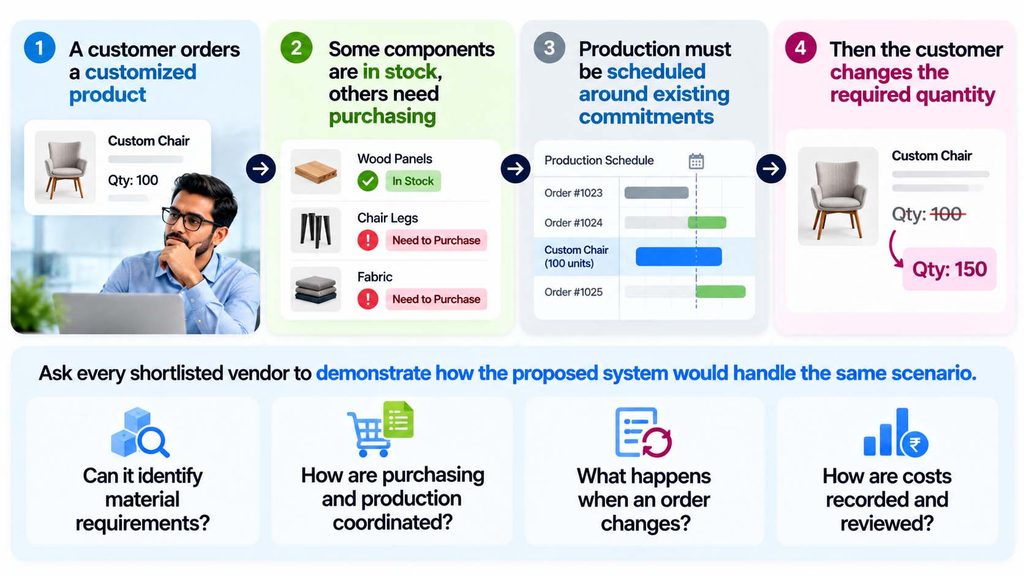
Most importantly, distinguish between what the system supports through standard functionality, what requires configuration and what needs additional development or integration.
A software demonstration should help reveal implementation effort, not hide it.
When is a Proof of Concept useful?
A Proof of Concept [or PoC] can help test an important requirement before committing to a broader implementation.
It may be appropriate when a critical manufacturing process is unusual, an integration is technically uncertain or stakeholders need evidence that a proposed workflow is feasible.
A PoC is not automatically necessary for every startup. A straightforward implementation may only require structured discovery, configuration demonstrations and testing.
The purpose is to reduce uncertainty, not introduce another project simply for the sake of it.
Will it work with your existing tools?
Buying new software doesn’t necessarily mean replacing everything you already use.
Your accounting system may be reliable. Your eCommerce store may be generating consistent orders. Your payment gateway may already meet customer expectations.
The question is whether those applications can work together where necessary.
Consider a retailer whose website captures customer orders, while warehouse staff maintain inventory in another system.
If every order requires manual re-entry, discrepancies become more likely as volumes increase.
An integration might help synchronize relevant information. Alternatively, an integrated platform might reduce the number of separate systems involved.
Neither approach is automatically superior.
When comparing solutions, investigate whether suitable integrations exist, which information needs to move between systems and how errors or failed synchronization will be handled.
Also ask who will maintain those connections when applications change.
An integration that looks simple in a demonstration may require ongoing monitoring, support or development.
The objective is to reduce unnecessary work while retaining the applications that genuinely serve your business well.
What will the software really cost?
The first number most founders compare is the subscription price.
But subscription fees are only one part of the investment.
Consider two hypothetical software proposals.
Software A costs ₹15,000 per month and meets most requirements using standard functionality.
Software B costs ₹8,000 per month but requires additional applications, customization and ongoing technical support.
Which one is more economical?
Without understanding the implementation and operating costs, you cannot know.
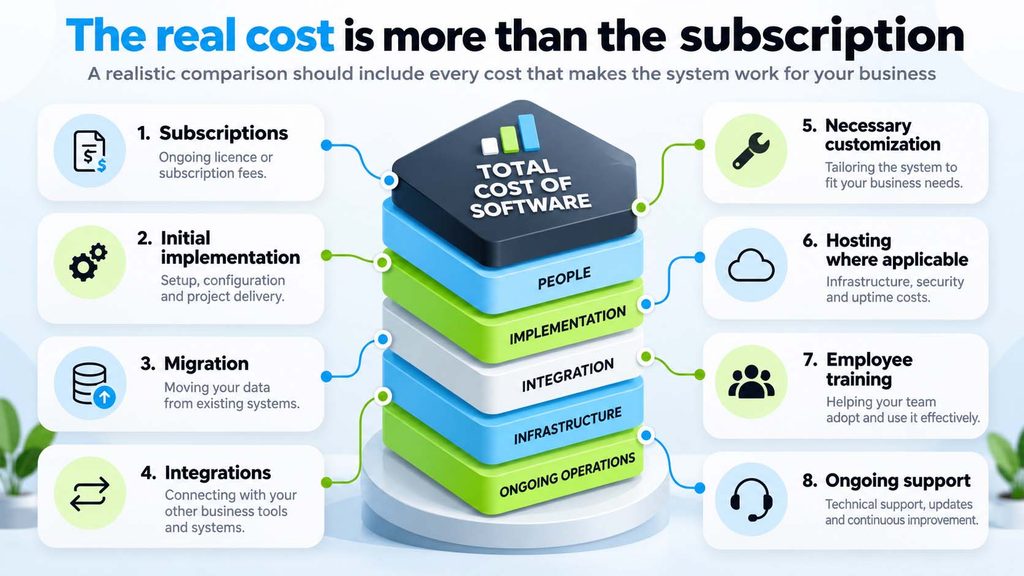
There may also be internal costs. Your employees will need time to participate in workshops, clean existing data, test processes and learn the new system.
Look beyond the first-year quotation
Compare what each solution is likely to cost over three years.
Also distinguish recurring charges from one-time costs, and ask how pricing changes as users, applications or transactions increase.
For startups, cash flow can be just as important as long-term cost.
A technically capable system that demands too much investment too early may not be the most practical choice.
The least expensive subscription isn’t always the lowest-cost solution. And the most expensive solution isn’t automatically the most capable for your business.
Will your employees actually use it?
A founder may approve the software, but employees determine whether it becomes part of daily operations.
A salesperson needs to update leads quickly. A warehouse employee needs to record stock movements accurately. A finance executive needs reliable transactions and reports.
All three may use the same platform, but their daily expectations are different.
💡Include representative users during software evaluation.
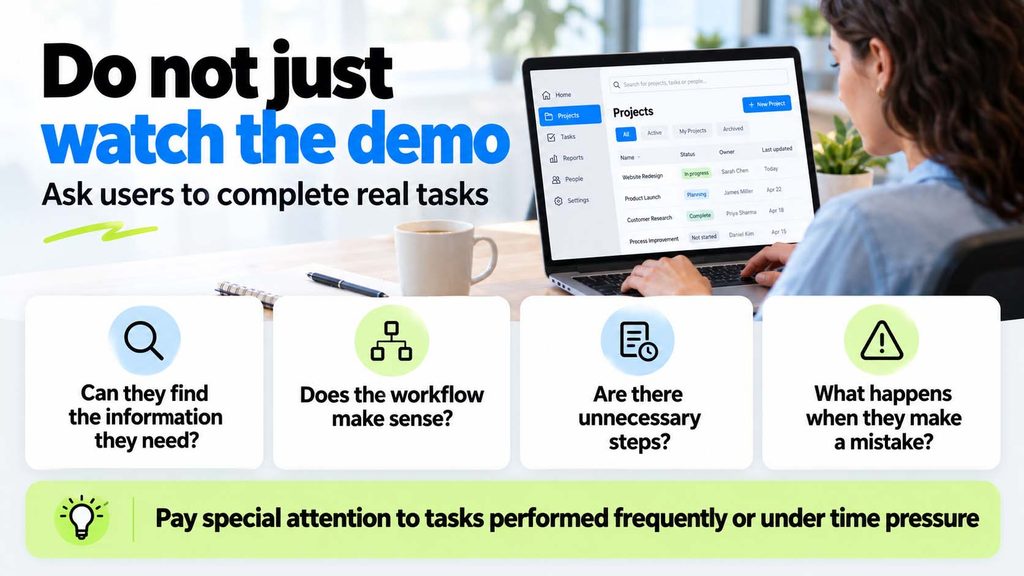
Training is important, but it cannot compensate for every usability problem or poorly designed process.
When software is unnecessarily difficult to use, employees may continue maintaining separate records or bypassing established workflows.
That undermines the reliability of the information management expects to see.
A system is only as useful as the quality and consistency of the work recorded in it.
Can the software grow with your business?
Growth can take many forms.
You may open new branches, introduce additional products, enter new markets, increase transaction volumes or start manufacturing products that you currently outsource.
Each change can create different software requirements.
A company may add fifty employees without significantly changing its workflows. Another may remain a ten-person business but introduce complicated stock movements, manufacturing processes or cross-border transactions.
That’s why employee count alone is not a reliable measure of software complexity.
When evaluating solutions, consider whether they can accommodate the growth scenarios relevant to your business.
Ask what would be required to add locations, users, entities, integrations or operational capabilities.
Some changes may be supported through existing features or configuration. Others may require additional subscriptions, deployment changes or custom development.
You don’t need to implement every possible future requirement now.
But you should understand what expansion might involve before making a long-term commitment.
What happens if you need to switch platforms?
This question rarely receives much attention during software demonstrations.
But it can be important later.
What happens if your business outgrows the system, your requirements change or you decide to move to another platform?
- Can you export your customer records, products, accounting information and transaction history in usable formats?
- Will you retain access to important documents and historical data?
- What happens to custom applications, integrations and reports?
- Also consider any contractual requirements, export charges, data retention policies and technical limitations that could affect a future migration.
Different platforms offer different levels of access, portability and customization flexibility. These should be verified for the specific product, edition and deployment arrangement being considered.
You may never switch systems.
However, understanding the implications early can help you avoid unnecessary dependence on a solution that becomes difficult to change.
Who will take ownership of implementation?
Buying software and implementing it successfully are different responsibilities.
👉The founder approves the investment
👉An internal point of contact coordinates with the implementation team
👉Department heads participate in workshops and employees attend training
Everything appears organized.
Then conflicting requirements begin to emerge.
Sales expects one approval process. Finance expects another. The implementation consultant receives both instructions, but nobody has authority to resolve the disagreement.
The issue isn’t necessarily a software limitation or implementation failure.
It’s an internal decision-making gap.
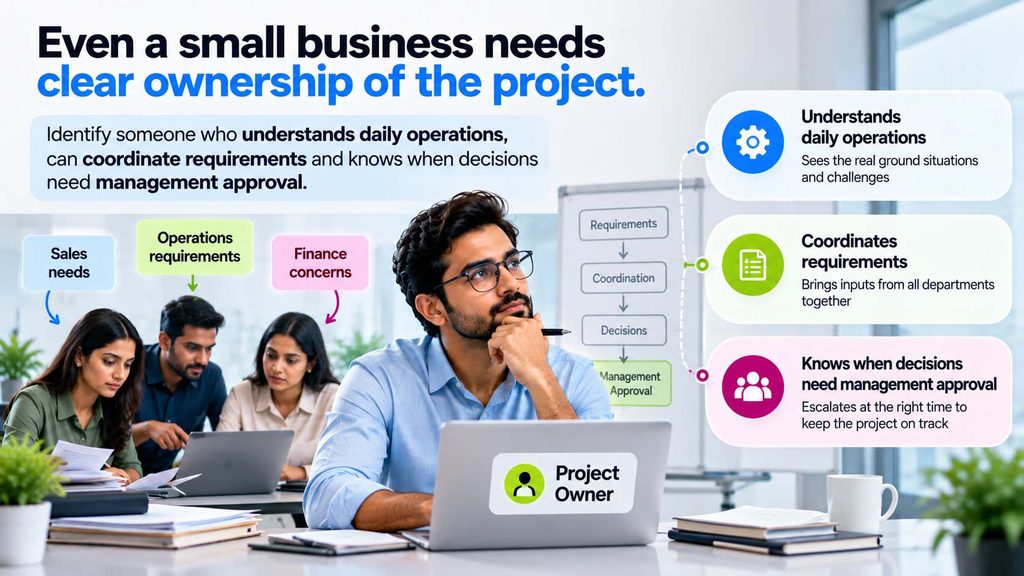
The founder doesn’t need to attend every configuration discussion or training session.
However, decisions that materially affect scope, budget, business policies and implementation priorities should remain visible to the appropriate leadership team.
A good implementation depends on collaboration between the business and its implementation partner, with responsibilities clearly understood on both sides.
You can delegate implementation activities. But ownership of business decisions must remain clear.
How will you measure whether the investment worked?
Going live is an important project milestone.
But it isn’t the ultimate measure of success.
The real question is whether the business operates better after the software is introduced.
Suppose your team previously missed customer follow-ups.
After implementing CRM, are enquiries assigned more consistently? Are salespeople completing planned activities? Has the time required to prepare pipeline reports improved?
If inventory accuracy was your concern, are discrepancies reducing?
If finance teams spent hours manually reconciling transactions, is that effort decreasing?
Define a few meaningful measures before implementation begins. Record the current situation wherever possible so you have a baseline for comparison.
These measures should reflect the reasons you invested in software, not simply how many modules were installed.
And allow sufficient time for employees to learn the system and for reliable patterns to emerge.
The goal isn’t to prove that people are using the software. It’s to determine whether the software is helping the business work better.
Comparing Odoo, Zoho, SAP and other business software options
Once you’ve identified your requirements, you can compare software more meaningfully.
The following are common platforms businesses may investigate. They aren’t interchangeable products and each has its own applications, editions, capabilities and implementation considerations.
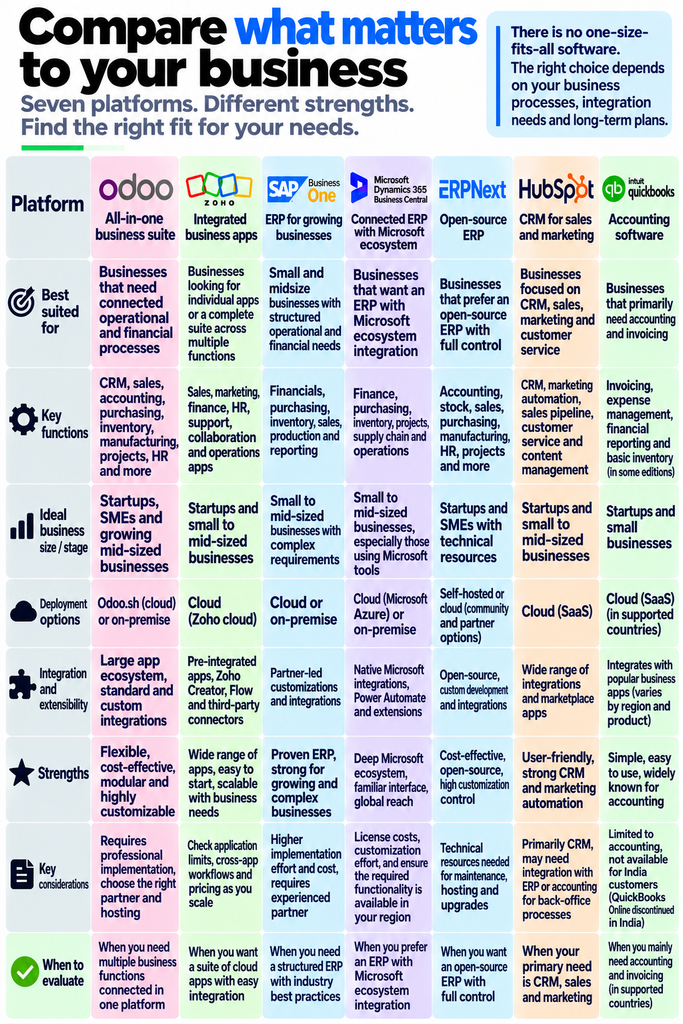
🚩This table is intended to help identify what to research, not declare a winner.
For example, Odoo and SAP Business One may both be considered for connected operational processes. Zoho offers a broad application ecosystem, while HubSpot is commonly evaluated for CRM-led requirements.
🚩These distinctions don’t mean one platform is inherently better.
A business may need only a dedicated CRM today. Another may need accounting and inventory to share information. A third may require manufacturing functionality that warrants a more extensive ERP assessment.
The sensible approach is to shortlist relevant options and evaluate each against the same documented business scenarios.
Where does Odoo fit for startups and growing businesses?
Odoo can be worth evaluating when sales, purchasing, inventory, accounting, manufacturing, projects or other functions need to work together.
Its application-based structure allows businesses to assess which capabilities are relevant rather than automatically implementing every available module.
However, implementation requirements and costs depend on the edition, subscription plan, deployment arrangement and business needs.
Odoo’s available plans have different provisions for capabilities such as external API access, multi-company operations and customization. Certain integrations, hosting arrangements or extensions can also introduce additional requirements and costs.
That makes requirements analysis important, even when the initial project appears relatively small.
Businesses should evaluate what standard Odoo can support, identify necessary configuration and integrations and consider customization only where it delivers justified business value.
For some startups, a limited first phase may be sensible. Others may need several connected functions from the beginning because the processes depend on each other.
The right Odoo implementation scope should come from your business requirements, not from the number of applications available.
The business software evaluation checklist
Before finalizing your shortlist, see whether you can confidently answer these questions :
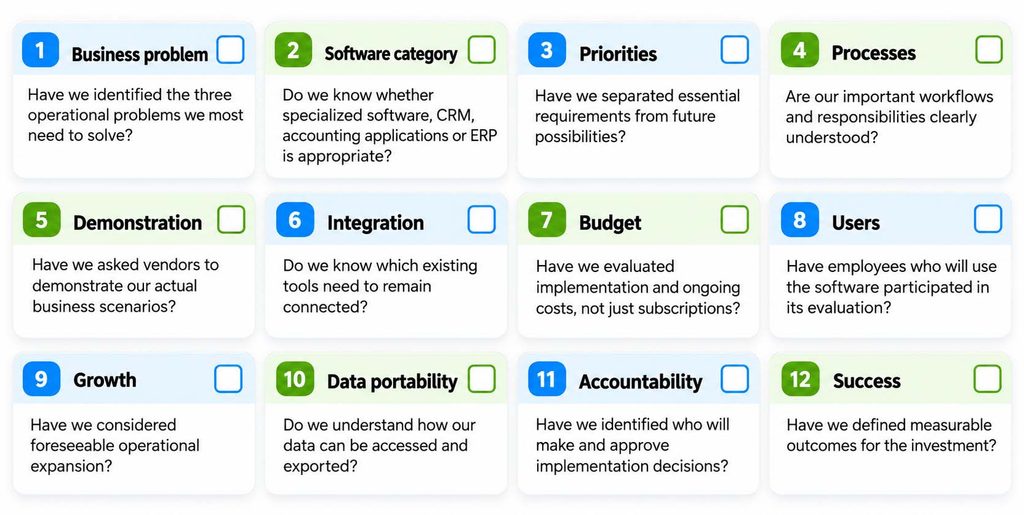
You don’t need perfect answers to every question before speaking with a software consultant.
But the clearer you are about your business, the more productive those conversations become.
You can also use this checklist to compare shortlisted vendors consistently rather than making a decision based on which demonstration looked most impressive.
Make the right decision before making the investment
Choosing business software isn’t about finding the platform with the longest feature list, the lowest subscription price or the most convincing sales demonstration.
It’s about understanding the business you’re building.
A startup with straightforward requirements may benefit from a focused CRM or accounting solution. A growing company with connected purchasing, inventory, finance and operational processes may be ready to evaluate an integrated ERP.
Neither decision is automatically right or wrong.
What matters is knowing which problems need attention, which processes must work together, what the investment will require and how the business will manage the change.
Sometimes the right approach is to begin with a small, focused implementation. Sometimes several functions need to be connected from the outset. And sometimes the most valuable first step is simply understanding your processes better.
The right software should support the way your business works today, without limiting where it can go tomorrow.
Still comparing business software? Let’s discuss what your business actually needs.
At Pragmatic Techsoft, we’ve worked with Odoo for over 17 years, helping businesses understand their requirements, implement connected processes and improve how their systems support daily operations.
Our experience spans Odoo consulting, implementation, customization, integration, migration and ongoing support.
We understand that deciding whether an ERP is appropriate can be just as important as deciding how to implement one.
If you’re considering Odoo, comparing ERP options or trying to determine which business processes should be digitized first, our consultants can help you evaluate your requirements and explore where Odoo could be a practical fit.
Because a successful implementation begins with understanding your business, not choosing a list of modules.
Book a one-on-one free consulting session with our experts
Frequently Asked Questions (FAQs)
1. What is the best business software for a startup?
The best software depends on the startup’s business model, operational complexity, budget and requirements. CRM may be appropriate for sales-focused needs, while accounting software can support financial administration. Businesses with interconnected processes may benefit from an ERP or integrated application suite. Comparing real workflows is more useful than relying on general software rankings.
2. Does every startup need an ERP system?
No. Many startups operate effectively with specialized applications, particularly when their workflows are relatively straightforward. ERP becomes worth evaluating when activities such as sales, purchasing, inventory, accounting or manufacturing increasingly depend on shared information and coordinated processes.
3. What is the difference between CRM and ERP software?
CRM primarily focuses on managing customer relationships, enquiries, opportunities and sales activities. ERP typically covers broader operational and financial processes. The distinction isn’t absolute because many ERP systems include CRM, while CRM ecosystems may offer additional business applications.
4. How much does business software cost for a startup?
Costs vary by product, edition, country, users and requirements. Businesses should consider subscriptions, implementation, migration, integrations, training, hosting where applicable and ongoing support. A three-year total cost comparison is often more useful than evaluating introductory subscription prices alone.
5. Is Odoo suitable for startups and small businesses?
Odoo can be suitable for startups and small businesses, particularly when several business applications need to work together. However, the right plan, scope and implementation approach depend on the company’s requirements. Some businesses may need only limited functionality initially, while others require connected operational workflows from the beginning.
6. Should startups choose separate applications or an integrated ERP?
Separate applications may be practical when business needs are limited and independent. An integrated ERP may offer advantages when several departments need consistent information and connected transactions. Businesses should also account for integration, maintenance and migration costs before choosing either approach.
7. What should founders ask during a software demonstration?
Ask vendors to demonstrate actual business scenarios, including exceptions such as unavailable stock, changed orders or approval delays. Clarify what is supported through standard functionality, what requires configuration, what needs customization and what additional implementation effort may be involved.
8. Does a startup need a Proof of Concept before implementing ERP?
Not necessarily. A Proof of Concept can be useful when critical requirements are complex or technical feasibility is uncertain. Straightforward implementations may proceed through structured discovery, solution demonstrations, configuration and testing without requiring a separate PoC engagement.
9. Can a startup implement Odoo in phases?
Yes. Odoo implementations can be planned in phases according to business priorities and process dependencies. The first phase should deliver a useful operational outcome while accounting for the information and workflows that need to remain connected. Not every application needs to be introduced immediately.
10. How can Pragmatic Techsoft help a business evaluating Odoo?
Pragmatic Techsoft provides Odoo consulting, implementation, customization, integration, migration and support. Our consultants can help businesses examine existing processes, define requirements, assess how Odoo could meet those needs and plan a practical implementation approach.