

You may not need to replace Xero
A lot of growing businesses reach a strange point.
Xero is still working. The accountant still likes it. The finance team still trusts it.
But everything around Xero has become harder.
Orders are increasing. Inventory is moving faster. Sales teams need CRM visibility. Warehouses need stock accuracy. Purchasing needs approval flows. Management wants reports without waiting three days.
And honestly, that’s where the real problem begins.
Not because Xero is bad. Because the business is now asking Xero to handle work it was never built to handle.
For many growing companies, the better move isn’t replacing Xero. It’s keeping Xero for accounting and connecting it with Odoo for operations. That’s the point where an Odoo Xero Connector becomes valuable – and it’s a pattern playing out across a huge number of businesses right now.
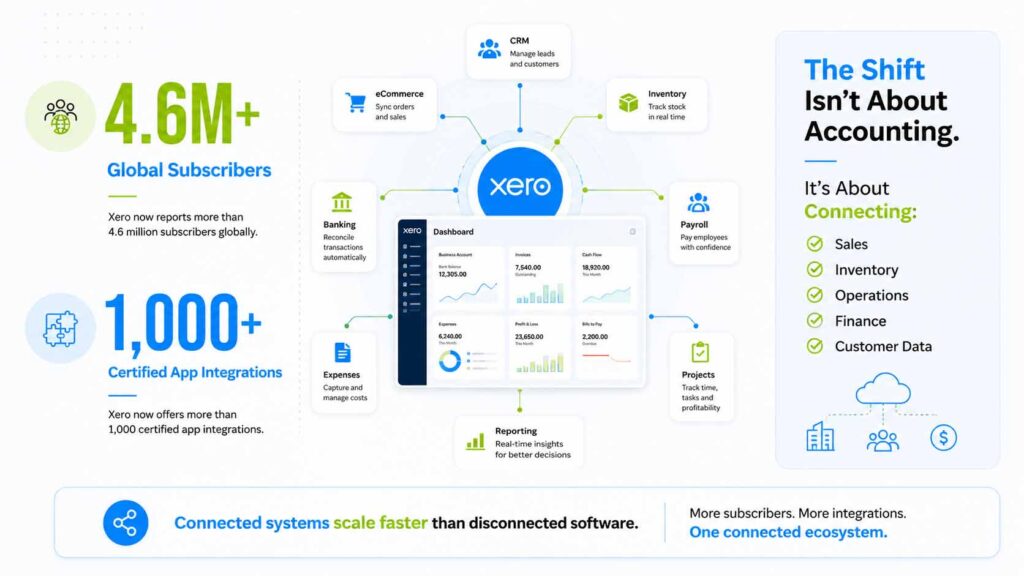
Even Xero’s own ecosystem is built on the assumption that most growing businesses will eventually need other systems working alongside it.
What Xero is great at
Xero is strong for finance-first workflows – invoicing, bills, bank reconciliation, accounting reports, tax workflows and payments. It also leans heavily on its app marketplace to extend into areas like inventory, manufacturing and CRM rather than building those deep capabilities natively.
With its open API approach, Xero has become one of the most integrated accounting platforms around, with over 1,000 apps in its marketplace covering payroll, payments, eCommerce, CRM and expense management.
That scale matters for context.
Xero serves more than 4.6 million subscribers across over 180 countries and in 2025 it crossed 4.2 million subscribers while repositioning itself from a pure accounting tool toward an AI-driven business platform.
Its platform connects small and medium businesses, banks and over 1,000 apps – which tells you the marketplace isn’t a side feature. It’s core to how Xero expects businesses to fill operational gaps.
So the issue isn’t whether Xero is useful. It clearly is.
But the real question is :
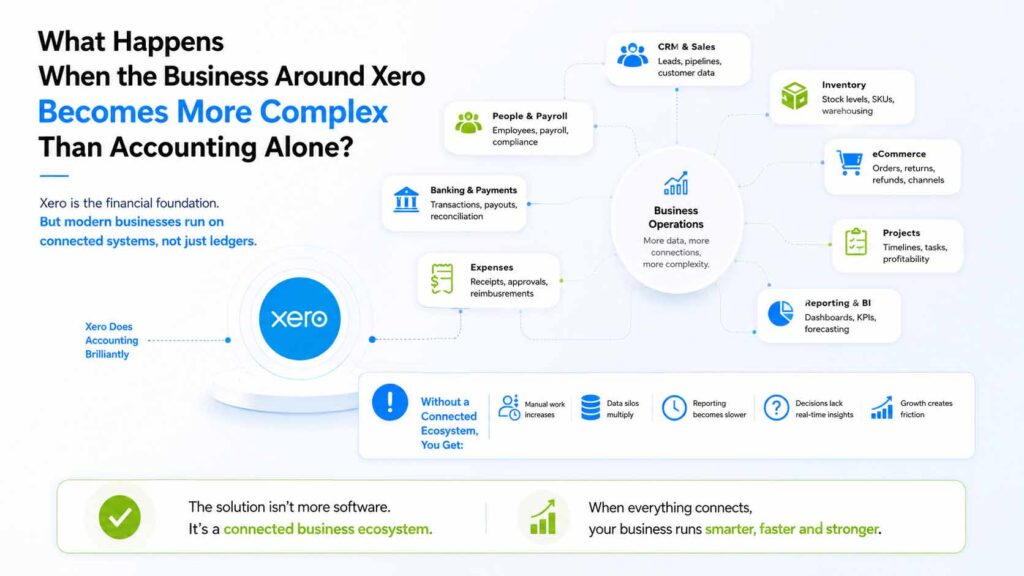
That’s where many teams start building workarounds and where the cracks start to show.
7 signs your Xero setup is ready for Odoo
1. REPORTS ARE TAKING LONGER THAN THEY SHOULD
When transaction volume grows, reporting usually gets harder – not because the accounting is wrong, but because the data needed for a complete picture is scattered across multiple tools, spreadsheets, and add-ons.
This isn’t a niche problem.
According to recent research, 94% of finance teams still use Excel to drive their month-end close process, and 50% say it’s a key reason their close is so slow.
Most organizations aim for a 5–10 day close, yet roughly 25% take 10 or more days – and fragmented data systems across multiple ERPs, spreadsheets and point tools are one of the biggest culprits.
If your month-end has quietly stretched from a few days to a week or more, the issue often isn’t Xero itself – it’s that Xero is being asked to be the single source of truth for things that live elsewhere.
2. YOU ARE LIVING IN ADD-ONS
One app for inventory. One for CRM. One for manufacturing. One for projects. One for reporting.
At first, add-ons feel flexible. But the Xero ecosystem itself is enormous – Xero has passed the 1,000 connected apps milestone, adding more than 10 new apps to its marketplace every month and popular bookkeeping-automation apps in the Xero App Store now connect to 11,500+ apps, banks and other tools on top of Xero itself.
That’s a sign of how much businesses are stitching together just to get a complete operational picture.
After a point, each new add-on creates another problem: too many systems holding different pieces of the same transaction, each with its own login, sync schedule, and edge cases. That’s often the trigger to consider Odoo – because Odoo can bring sales, purchasing, inventory, manufacturing, CRM and operations into one connected system, with Xero handling the books behind it.
3. SPREADSHEETS ARE BACK IN CHARGE
This is one of the clearest signs, and the data backs it up. 94% of finance teams still rely on Excel to drive month-end close and finance professionals describe being buried in spreadsheets, combing through scattered records and manually tracking data from different sources just to close the books.
If your team is still exporting data into Excel to understand margins, inventory, sales performance, purchase commitments, or stock movement, your systems aren’t giving you the visibility you need.
Spreadsheets aren’t the problem. Depending on them for core business control is. The gap between teams that close in 1–2 days and teams that take a week or more usually isn’t talent or budget – it’s whether the underlying systems actually talk to each other. If the business has to leave the system to understand the business, something is missing.
4. MULTI-COMPANY VISIBILITY IS BECOMING MESSY
As companies expand, they often create separate entities, branches or regional operations – and in Xero, multi-entity setups typically mean separate organizations, each with its own data, subscription and reporting.
This is where Odoo helps operationally.
With the Odoo Xero Connector, the integration is built to handle bi-directional data flow between Xero and Odoo across accounts, contacts, products, orders, invoices and payments, and the connector’s published features include multi-company configurations – for example, Company A in Odoo linking to Xero Organization A, Company B to Xero Organization B, and so on, with multi-currency support included as part of that setup.
For finance leaders managing multiple entities, this matters because many multi-entity groups report month-end close stretching beyond 15 days when consolidation, reporting and data exports are all done manually across separate Xero organizations.
5. INVENTORY AND OPERATIONS ARE GETTING TOO COMPLEX
This is usually the strongest reason to consider Odoo – and it’s backed by hard limits, not just opinion.
Xero does offer tracked inventory with stock-on-hand reporting, but it comes with real ceilings. Xero itself recommends considering another inventory app if your organization has more than 4,000 inventory items, wants periodic (month-end) inventory updates, manufactures goods for sale, operates with negative inventory or needs purchase order receipts.
Beyond the item count, Xero’s inventory management lacks barcode scanning, doesn’t support multiple warehouses or locations, has a practical ceiling of around 4,000 items, and doesn’t handle serial or lot tracking.
There are also soft performance limits around transaction volume – roughly 1,000 sales invoices and 1,000 purchase bills per month (based on 10 line items each), 2,000 account transactions, and 2,000 bank lines per month – and Xero can only handle finished goods, not raw materials or work-in-progress and can’t operate with negative inventory.
For a growing business, that’s a long list of “not suitable if” conditions. Growing businesses typically need :
- Multi-warehouse visibility
- Stock reservations
- Manufacturing and bills of materials (BOMs)
- Purchase planning
- Sales order workflows
- Returns and credit note control
- Real-time operational reporting
That’s where Odoo becomes the operational layer. Xero remains the accounting system. Odoo runs the moving parts.
6. INTEGRATIONS ARE UNDER PRESSURE
When a business runs multiple connected apps, every integration depends on clean, reliable data movement – and Xero’s API has firm limits that matter once volume increases.
Xero enforces a concurrent limit of 5 API calls in progress at a time, a minute limit of 60 API calls per organization, and a daily limit of 5,000 API calls per organization, with an app-wide limit of 10,000 calls per minute across all tenancies. If these limits are exceeded, the API returns a 429 “Too Many Requests” error until the request window resets.
To put that in concrete terms: syncing a single invoice typically takes around 5–6 API calls (checking or creating the contact, checking or creating line items, creating the invoice, and applying payments), which means a typical integration can sync roughly 800–900 invoices per day per Xero organization before hitting the daily ceiling.
For a business doing a few dozen invoices a day, that’s not a concern. But once you’re running multiple integrations, frequent syncs, and large data updates — especially across several entities — SaaS teams are advised to avoid unnecessary full-data syncs and instead use incremental sync and webhooks, because the daily limit is often the bigger bottleneck than the per-minute one. Each connected Xero organization gets its own separate 5,000-call daily allowance, so the more entities and add-ons you run, the more this becomes an architectural question rather than a minor technical detail.
A structured Odoo Xero Connector – built specifically to batch, queue, and schedule syncs – is a more sustainable approach than scattered manual exports and disconnected app flows hitting the same API limits independently.
7. REPORTING IS NOT REAL-TIME ENOUGH
This is where leadership feels the pain.
Sales thinks the order is confirmed. The warehouse says stock is unavailable. Finance hasn’t raised the invoice yet. Management wants the margin report.
Nobody is wrong. They’re just looking at different systems that update on different schedules.
This disconnect shows up in broader small business data too. Xero’s own Small Business Insights data, drawn from 32,000 US subscribers, found that in 2025 small business sales growth averaged just 2.4% year-over-year, about half the long-term average of 5.5% even as the wider economy grew faster. Part of that gap often comes down to businesses making decisions on lagging, fragmented data rather than a real-time operational picture.
Connecting Odoo and Xero helps reduce that gap by giving operations and finance a shared, synced view instead of each team manually rebuilding the truth at month-end.
Why Odoo complements Xero
Xero remains the finance system your accountant already trusts – and with roughly 200,000 certified accounting and bookkeeping partners globally built around it, switching accounting platforms is rarely the path of least resistance anyway.
Odoo, meanwhile, can manage :
- CRM
- Sales
- Inventory
- Purchasing
- Manufacturing
- Warehouse workflows
- Operational reporting
The connector becomes the bridge between both — letting each platform do what it’s actually built for.
How the Odoo Xero Connector Works
Pragmatic Techsoft’s Odoo Xero Connector is designed to connect operational workflows in Odoo with accounting workflows in Xero. It performs bi-directional integration covering accounts (importing from Xero to Odoo and exporting from Odoo to Xero), analytic accounts and tracking options and a single-sync button available directly on form views to push or pull data on demand.
It supports automated data flow, secure OAuth 2.0 connection and real-time accounting updates, syncing key records such as :
- Chart of accounts
- Taxes
- Contacts
- Products
- Inventory
- Invoices and bills
- Credit notes and debit notes
- Journals and payments
The module also handles journal entry sync between Odoo and Xero as manual journals, and keeps validation on the accounts used for income, sales, and payments — with invoices reconciled automatically against payments imported from Xero.
What Pragmatic Techsoft’s Odoo Xero connector offers
Pragmatic Odoo XERO Connector is an Odoo app that performs bi-directional integration between Xero and Odoo, built for businesses that want automation without losing control.
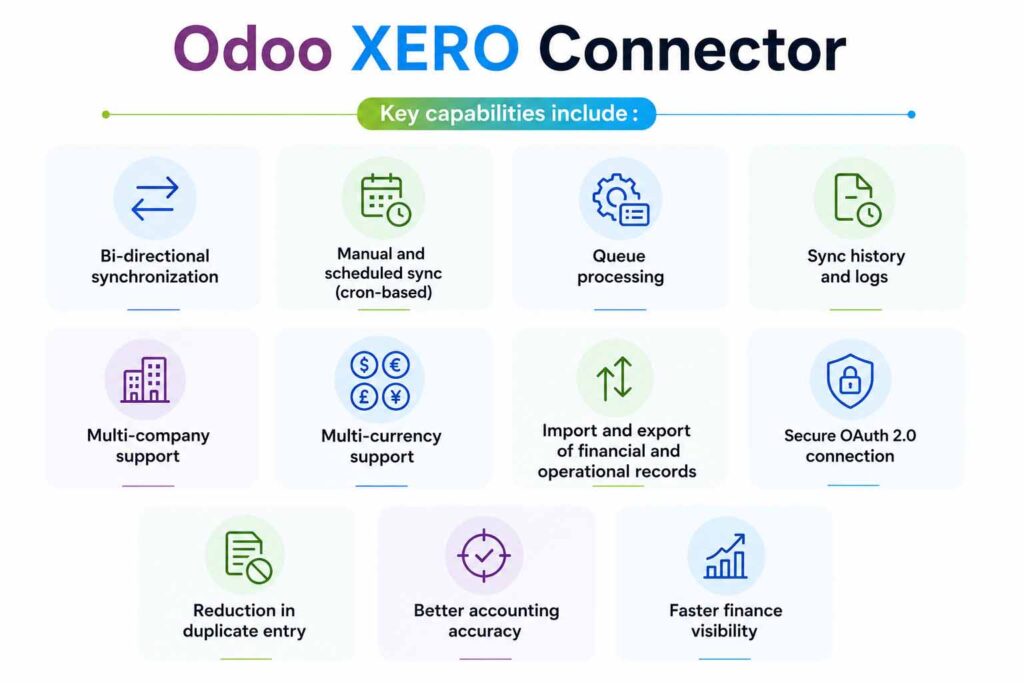
The module works and is tested on standard Odoo installations, with free support for setups without third-party apps and paid support for installations that include them – meaning the connector is designed to slot into an existing Odoo setup rather than requiring a ground-up rebuild.
The bigger picture here lines up with what’s happening across the broader Xero ecosystem too. Xero’s connected-app ecosystem has shifted in 2026 toward AI-native apps and updated developer policies – a sign that the market increasingly treats Xero as one node in a connected stack rather than an all-in-one platform, which is exactly the model the Odoo Xero Connector is built around.
You’re not outgrowing Xero. You’re outgrowing Xero-only.
And so we suggest – Keep Xero. Add Odoo. Connect Both.
Because if three or more of these signs feel familiar, the issue probably isn’t Xero.
It may be that your business has outgrown Xero-only. That’s an important distinction.
You likely don’t need to replace the accounting system your team already trusts. You may need to stop forcing it to manage inventory, operations, manufacturing, CRM, purchasing, and reporting workflows that belong in a stronger operational system – especially given Xero’s own published limits around inventory items (4,000), monthly transaction volumes and API call quotas (60/minute, 5,000/day per organization).
That’s where Odoo and Xero together make sense.
With Pragmatic Techsoft’s Odoo Xero Connector, businesses can keep Xero for accounting while using Odoo to manage the operational complexity around it :
- Finance gets clean accounting data.
- Operations gets proper workflows.
- Leadership gets better visibility.
- Teams stop wasting time moving the same information from one system to another.
Pragmatic Techsoft has worked with clients across more than 50 countries, building custom Odoo ERP systems and integrations to fit specific business goals – making it a practical partner for businesses that want to connect Odoo and Xero properly instead of creating another workaround.
If you’re using Xero and exploring Odoo for operations, this is the right time to review your current workflow and see what can be automated.
💬Contact our team to see a demo or share your queries regarding the connector to su*****@*********co.in.
FAQs
1. Do I need to replace Xero with Odoo Accounting?
No. The point of the connector is to let businesses keep Xero for accounting while using Odoo for operations.
2. Who should use an Odoo Xero Connector?
It’s useful for businesses that use Xero but need stronger workflows for inventory, sales, purchasing, manufacturing, CRM, warehouses, or multi-company operations – particularly once they approach Xero’s inventory item limits (around 4,000 tracked items) or its monthly transaction soft limits.
3. Can Odoo and Xero sync both ways?
Yes. Pragmatic Techsoft’s connector supports bi-directional synchronization between Odoo and Xero, including a single-sync button on individual records.
4. What data can sync between Odoo and Xero?
The connector supports records such as chart of accounts, taxes, contacts, products, inventory, invoices, bills, credit notes, debit notes, journals and payments.
5. Does the connector support multiple companies?
Yes. The connector supports multi-company setups where each Odoo company can connect with its own Xero organization – useful since each Xero organization has its own separate API quota (5,000 calls/day).
6. Does it support multi-currency?
Yes. Multi-currency is part of the connector’s supported configuration.
7. Is this only for companies already using Odoo?
No. It’s also relevant for Xero users evaluating Odoo because they need better inventory, sales, purchasing, manufacturing, or operational control.
8. What is the main business benefit?
Reducing duplicate entry, improving visibility between finance and operations, and keeping both systems aligned as the business grows – without hitting Xero’s inventory, transaction or API limits in the process.