
- Configuration of CCAvenue settings
- Sale Order processing
- Accepting the payment in CCAvenue
- Updating the payment received in Odoo
1.Configure CCAvenue
Install the payment_ccavenue module.
Goto Settings–>Configuration–>Accounting
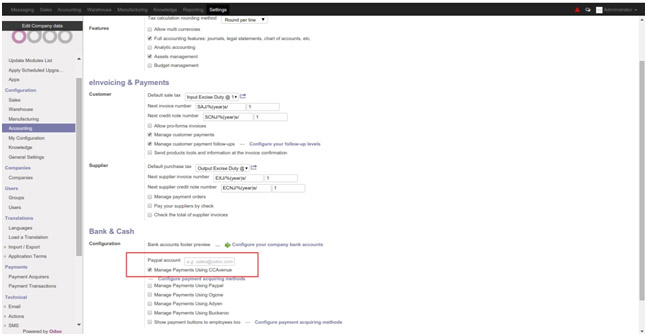
Click on Manage Payments Using CCAvenue.
Click on “Configure payment acquiring methods”
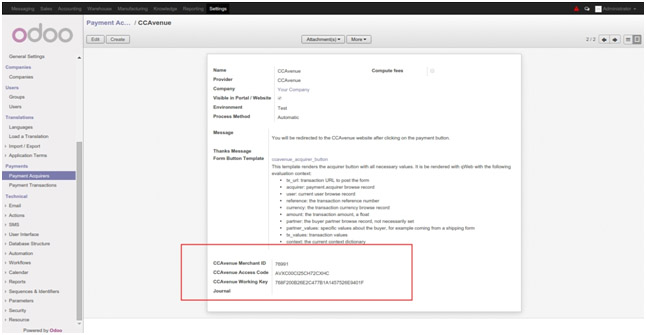
Configure your CCAvenue Account.
Put your Merchant Key , Access Code and Working key provided by CCAvenue.
Set the Associated Journal to create payment using CCAvenue.
2.Processing Sales Order
Go to Sales–>Sales–>Sale Order
– Create New Sale Order and Confirm it.
– You will see CCAvenue button in Online Payment Options.
– To Pay with CCAvenue Click on CCAvenue Button then it will redirect you to CCAvenue Website.

3.Accepting Payment in CCAvenue
– Login to your CCAvenue Account.
– Select Payment Method to Pay and pay.
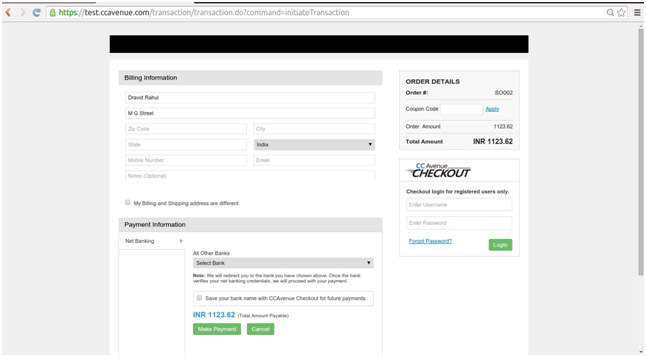
After successful payment you will be redirected back to Odoo.
4.Payments update in Odoo
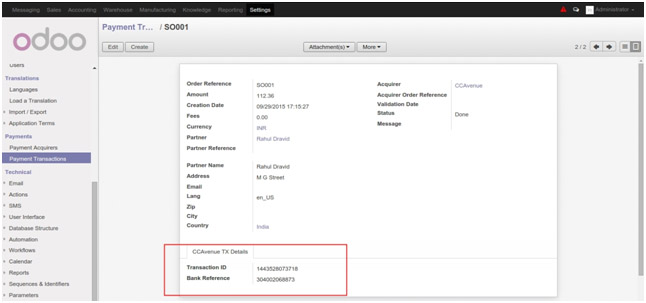
After successful payment one payment record is created in Odoo against the customer. In the reference you can see the CCAvenue transaction ID.
One transaction record is created in Payment Transactions where you can see all transaction related information.
Go to Settings–>Payments –> Payment Transactions