
The lead you already paid for
Somewhere in your ad account right now, there’s a lead who filled out a form, gave you their name and number, and has heard nothing back.
Not because your sales team doesn’t want to call them. Because nobody’s told them the lead exists yet.
If you run Facebook or Instagram lead ads, this is probably happening more than you realize.
You’re not losing leads to bad targeting or weak creative – you’re losing them to a gap between “form submitted” and “someone on your team sees it.”
That gap is invisible on a dashboard. It just quietly eats your ad spend.
This isn’t a niche problem. It’s the default state for any business running social lead ads without a system built to catch them the moment they land.
Why Facebook and Instagram leads go cold in the first place
Meta’s lead ads are genuinely good at generating interest. Someone sees your ad, taps it and fills out a pre-populated form without ever leaving the app.
Friction is close to zero, which is exactly why the leads are high-intent – they didn’t have to work for it, so they haven’t mentally committed the way a website form-filler has.
That high intent has a short shelf life.
And here’s the part most businesses don’t plan for – Facebook and Instagram lead forms don’t feed into the same place automatically and neither feeds into your CRM. They sit inside Meta’s own systems – Meta business suite for Facebook, a separate lead center for Instagram – waiting for someone to go get them.
So the ad works. The lead exists. It’s just sitting somewhere your sales team doesn’t live.
The hidden cost of the CSV handoff
In most businesses, someone eventually notices the leads are piling up and manually exports them. That usually means –
- Logging into two separate places for Facebook and Instagram leads
- Exporting two CSVs
- Cross-checking for duplicates
- Formatting the file so it matches CRM fields
- Uploading it, or worse, forwarding it to sales as a spreadsheet
Every one of those steps adds hours, sometimes days, to the gap between form fill and first contact.
Response-time research across industries consistently shows conversion odds drop sharply once you’re past the first hour and keep dropping from there.
None of this shows up as a “missing lead” in your reporting. Your ad account still says the form was filled. Your CRM, if the lead never made it in, says nothing at all. The leak is silent – which is exactly why it survives so long in most businesses without anyone catching it.
What a unified lead dashboard actually changes
The fix isn’t a bigger ad budget or a new targeting strategy. It’s closing the gap between the form and the pipeline.
When Facebook and Instagram lead forms connect directly into your CRM, in real time, from a single dashboard, three things change immediately :
No manual export
The lead syncs into the pipeline on its own schedule and you can pull it in instantly whenever you need to – no one has to remember to go check Meta.
No juggling two platforms
Facebook Pages and Instagram Business Accounts show up in one place, so nobody’s toggling between apps to figure out where a lead came from.
Form health is visible
If a lead form silently breaks – a common failure point with Meta integrations – you find out the same day, not three weeks into a campaign that was quietly generating zero leads.
This is infrastructure, not a growth hack.
It doesn’t get you more leads.
It makes sure the leads you’re already paying for actually reach someone who can act on them.
Inside the Odoo CRM Social Media Lead Form Dashboard
This is exactly what we built the Odoo CRM Social Media Lead Form Dashboard to solve.
It connects your Facebook Pages and Instagram Business Accounts directly into Odoo CRM, in one unified dashboard. Every lead form submission flows straight into your pipeline, ready to track, qualify and convert – no CSVs, no manual imports, no waiting for someone to log into Meta Business Suite.
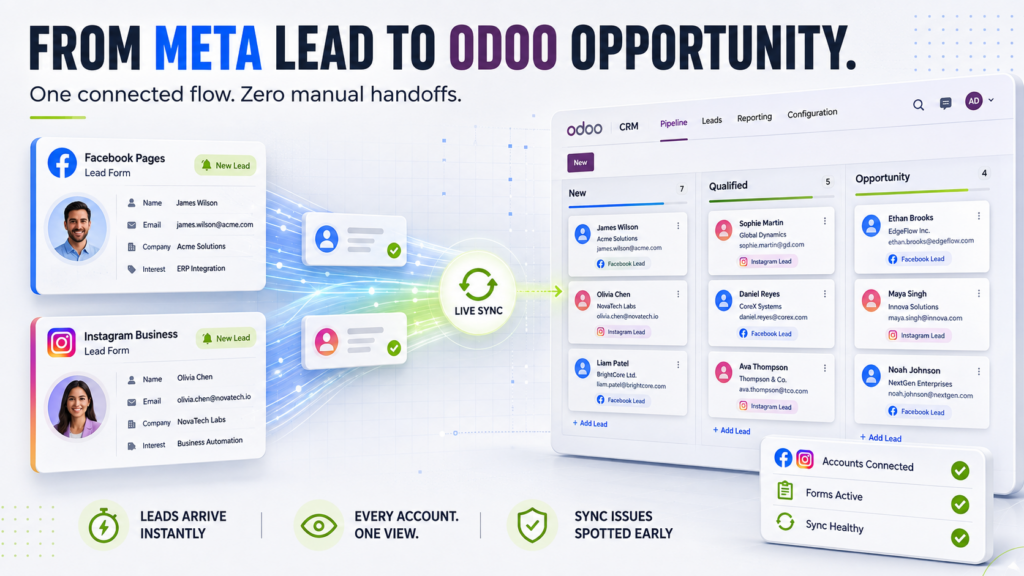
You can see every connected account in one screen and monitor form health from the same place, so a broken form or a stalled sync gets caught immediately instead of discovered weeks later in a quarterly report. For any team running paid social lead ads, it removes the operational complexity between “ad clicked” and “opportunity created” and keeps the data clean enough to actually work with.
How the sync actually works
Once your Facebook and Instagram Lead Integration modules are connected, the dashboard fetches leads automatically in the background on a set schedule – nobody has to remember to go pull them.
If a lead needs to be in the pipeline right now instead of waiting on the next scheduled run, there’s a manual “run now” option too, so an urgent lead never has to sit and wait on the clock.
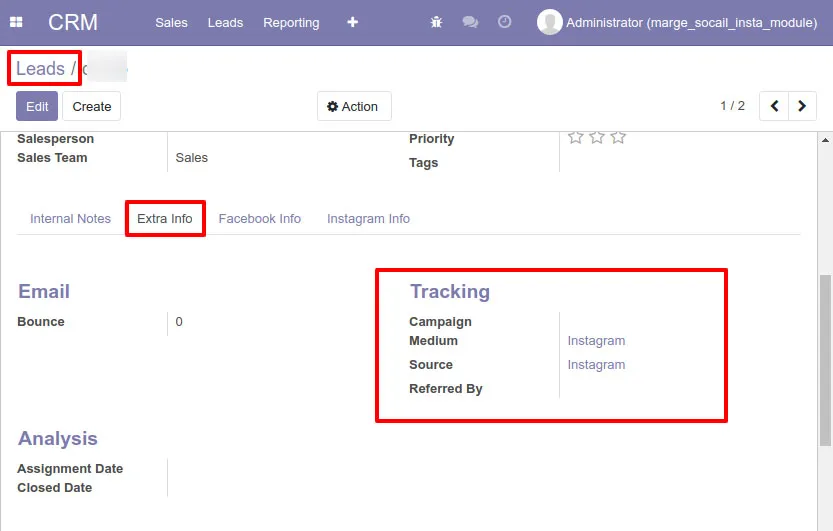
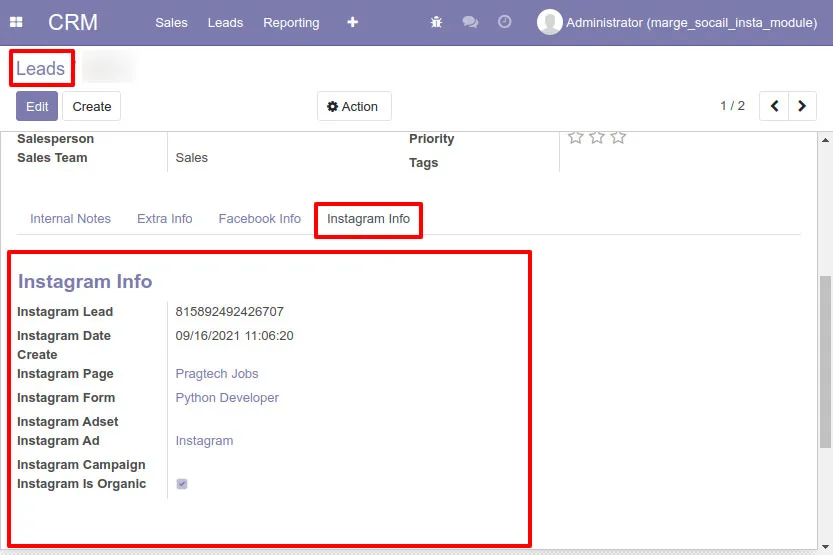
Either way, it lands in Odoo CRM with full tracking info intact – source page, form details, mapped fields – not just a name and number with no context.
Check out the instagram flow below 🔽
- Each lead is created with both mapped and unmapped fields, along with complete tracking information.

- Leads are created in Odoo with both mapped and unmapped fields, along with complete tracking information.
- All details from Instagram are captured.
Why this matters more than it looks like it should
It’s tempting to treat this as a small operational fix. It isn’t.
Every lead sitting unworked in a Meta inbox is money you’ve already spent with no path to return.
Fixing the handoff doesn’t cost you anything extra in ad spend – it changes what you get back from the spend you’re already committing.
For businesses running lead ads as a core acquisition channel, that’s often a bigger lever than the ad creative itself.
Choosing a partner who builds this, not just sells it
Plenty of vendors will sell you a CRM integration.
Fewer of them actually understand what happens on both sides of it – the Meta ad account and the Odoo pipeline – well enough to make sure it holds up once real traffic hits it.
Pragmatic Techsoft has spent years inside Odoo implementations, running full deployments for businesses that depend on their CRM actually working the way it’s supposed to.
That’s the difference between an app that technically connects two systems and one that’s built by people who understand why the connection breaks in the first place, and design around it.
Beyond this dashboard, Pragmatic also builds and maintains dedicated Facebook and Instagram CRM integrations, and works directly with businesses on full Odoo implementation, customization and support, not a one-time install and goodbye.
If the goal is a CRM that actually reflects what’s happening in your pipeline, that’s the kind of partner worth having on the other end of it.
Clear next step
If you’re running Facebook or Instagram lead ads right now, take five minutes and check : how many of last month’s leads can your sales team account for?
If the honest answer is “we’re not sure,” that’s the gap this dashboard is built to close.
Reach out to Pragmatic Techsoft directly to talk through what your current lead flow looks like and where it’s leaking.
FAQs
1) Does this replace my existing Odoo CRM setup, or work alongside it?
It works inside your existing Odoo CRM. It’s not a separate system you have to maintain – leads land directly in the pipeline you’re already using, with your existing stages, fields and workflows intact.
2) What happens if my Facebook or Instagram lead form stops working mid-campaign?
The dashboard lets you monitor form health across all connected accounts in one place, so a broken or disconnected form is visible immediately rather than something you discover after weeks of a “quiet” campaign.
3) How is this different from just checking Meta’s own lead center regularly?
Meta’s lead center keeps leads inside Meta’s ecosystem, separate from wherever your sales team actually works. This dashboard moves them into your CRM pipeline in real time, so there’s no second system to remember to check.
4) Is this only useful for businesses running large ad budgets?
No – the handoff gap exists at any spend level. A business running a modest local campaign loses the same percentage of intent to delay as one running a national one; it’s just a smaller number of leads affected.
5) Which Odoo version do I need for this to work? Compatibility varies by release, so it’s worth confirming your exact version with Pragmatic’s team before installing to make sure it lines up with your current Odoo setup.